In short: to A/B test a Shopify bundle, show two versions of one offer to different visitors and compare revenue per visitor, not conversion rate, because a bigger discount can sell more and still earn less. Test one thing at a time, discount first, and wait for enough orders before trusting a winner. Nanflows Bundles for Shopify has A/B tests on every plan, including Free.
Every bundle comes with guesses. Will 15% off sell more than 10%? Is “Build my box” a better button than “Add to cart”? Should the bundle include the cap or not? An A/B test replaces those guesses with numbers from your own shoppers.
This guide explains how A/B tests work for bundles, what to test first, and how to read the result. The examples use Nanflows Bundles for Shopify, which has A/B tests on every plan, the Free plan included.
How an A/B test works
Half your shoppers see the bundle as it is (version A). The other half see a copy with one change (version B). After enough visitors, you compare what each version earned and keep the better one.
Three things make a test fair:
- Each shopper sees only one version, and keeps seeing the same one on every page and every visit.
- The cart and checkout match what they saw, including the discount.
- Only one thing changes. If you change the discount and the button text together, you won’t know which one made the difference.
Why revenue per visitor decides
It’s tempting to pick the version with more orders. But a bigger discount can win more orders and still earn you less.
Here is a made-up example, with 1,000 visitors on each version:
- A, 10% off: 50 orders at $90 = $4,500, or $4.50 per visitor.
- B, 20% off: 55 orders at $80 = $4,400, or $4.40 per visitor.
B sold more bundles and lost money. That’s why Nanflows judges tests by revenue per visitor, and leaves refunded orders out.
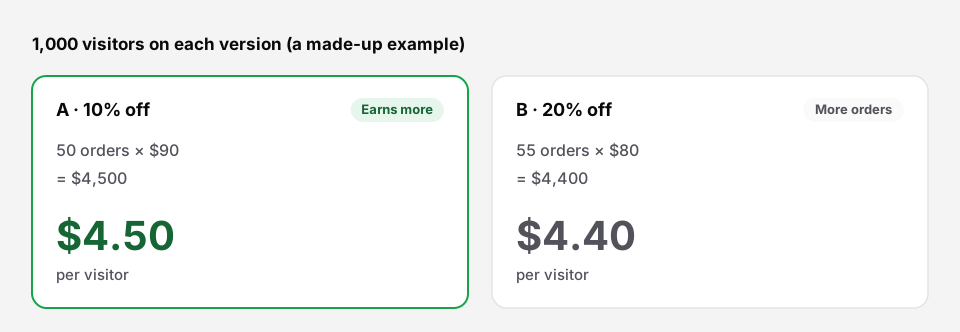 More orders isn’t the same as more money.
What to test first
1. The discount
The discount is usually the biggest lever and the most expensive mistake. Good first tests:
- 10% off against 15% off;
- a fixed price (“all three for $79”) against a percentage;
- a free gift (Buy X Get Y) against a percentage off.
2. The products
Which items are in the bundle matters as much as the price. Try a different extra product, or one product fewer. A cheaper three-item bundle can beat a four-item one.
3. The title and texts
The bundle name, the button text and the badge. “Complete the look” against “Frequently bought together”, or a “Best seller” label against none.
4. The design
Another layout (list, row or grid), another colour, or showing each item’s price.
Setting up a test in three questions
- Which bundle?
- What do you want to test? Discount, title and texts, design, or products.
- How many shoppers see version B? Half and half is recommended; 70/30 or 80/20 are there if you want to risk less.
Then Create version B. The editor opens a copy of the bundle on the right step, such as the Price & discount step for a discount test, with a reminder to change only that one thing. Nothing changes on your store until you press Start A/B test.
Reading the result
The result is given in plain words:
- “Too early to tell”: fewer than 7 days, or fewer than 100 shoppers on each version. It says how many more are needed.
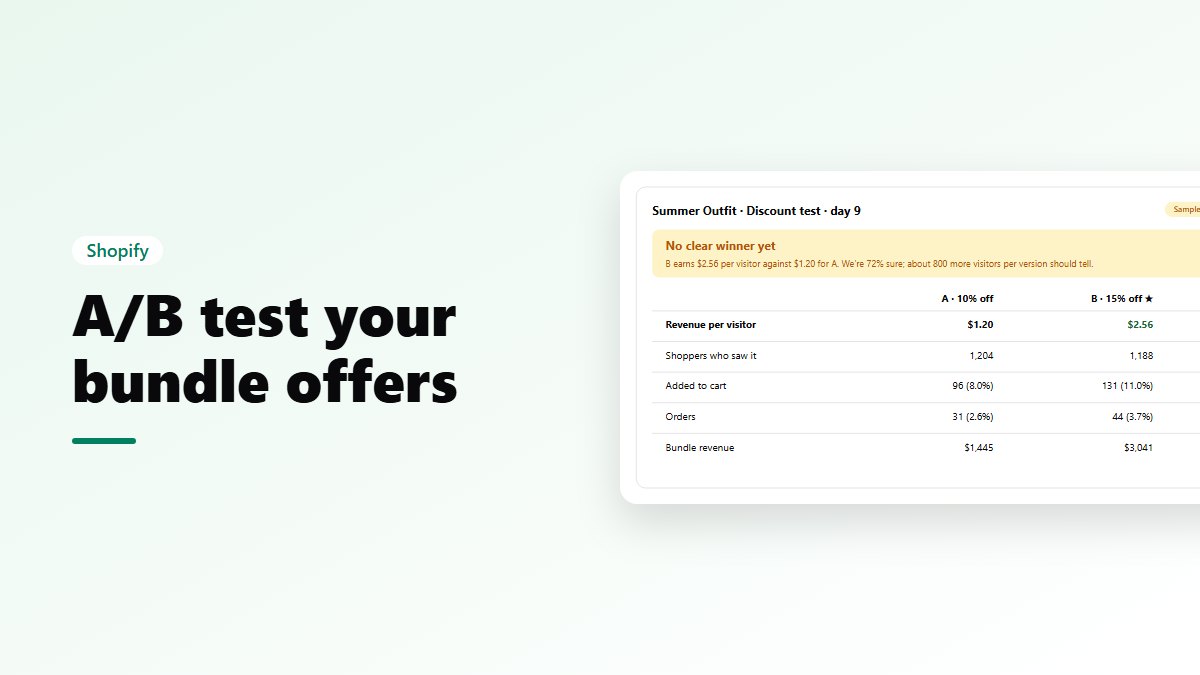
- “No clear winner yet”: for example, B earns $2.56 per visitor against $1.20 for A, but we’re only 72% sure, and about 800 more visitors per version should tell.
- “Version B is the winner”: once we’re at least 95% sure it isn’t luck.
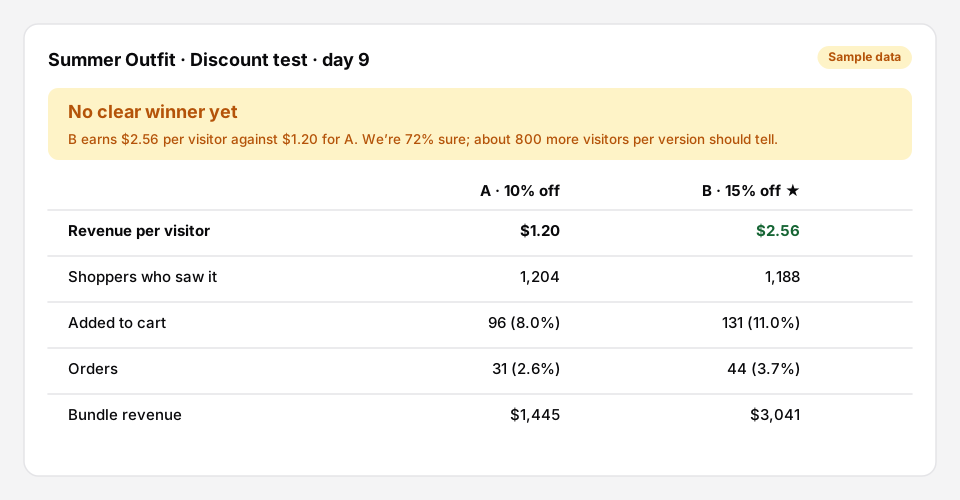 What a running test looks like (sample numbers).
Next to it you get both versions side by side: revenue per visitor, shoppers who saw it, adds to cart, orders and conversion rate, bundle revenue and the average bundle order.
Ending a test
Keep version A or version B, in one click. Keeping B saves its settings into your bundle, which keeps its name, its page and its history. The other version is switched off, but its numbers are kept.
Tips for tests you can trust
- Run for at least a week, so weekdays and weekends both count.
- Don’t edit the bundle during the test.
- Avoid big sale days, such as Black Friday. Shoppers behave differently then.
- Test one bundle at a time on the same page.
- Write down what you learn. “Our shoppers respond to a fixed price more than a percentage” is worth knowing for every future bundle.
Run your first test
- Nanflows Bundles for Shopify has A/B tests built in, on every plan. Every feature is on the Free plan up to $500 of bundle sales a month; paid plans are $19, $39 and $79 a month, with a 15-day trial.
- More on the Shopify bundle app, and how it compares with Bundler and Fast Bundle.
FAQ
Which bundles can be tested?
Every bundle priced by the bundle discount, which is every type unless it’s sold as its own product.
Do A/B tests cost extra?
No. They’re on every plan, including Free. Plans differ only in how much in bundle sales they cover each month.
Where do I see all my tests?
On the A/B tests page, with each test’s status (“Running · day 5”), result and revenue per visitor. Bundles being tested show an “A/B test running” badge in your bundle list.