In short: a subscription bundle is a set of products that arrives on a schedule, like a coffee box every month, with a subscribe & save price. With Nanflows Bundles for Shopify, the bundle discount stacks on top of the subscription discount and carries over to every renewal. It works with Shopify Subscriptions and other apps that use Shopify’s standard subscription plans, such as Recharge, Seal, Appstle and Loop.
A subscription bundle is a set of products that arrives on a schedule: a coffee box every month, a skincare routine every 6 weeks, a snack pack every week. For the shopper it’s convenience; for you it’s repeat revenue without winning the customer again.
This guide shows how subscribe & save works inside a bundle with Nanflows Bundles for Shopify.
How it works for the shopper
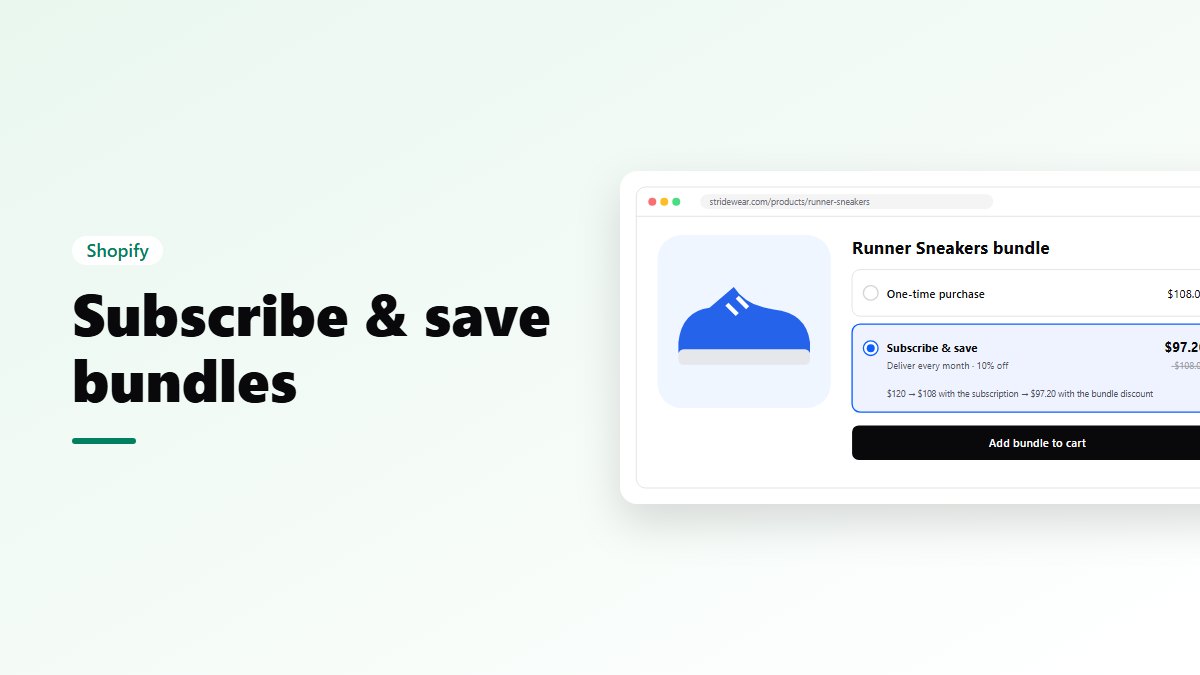
- The bundle shows a choice: One-time purchase or a subscription option, such as “Deliver every week, 10% off”.
- They pick one and add the bundle.
- Checkout shows the delivery schedule.
Items that are in your subscription plan become a subscription. Items that aren’t are simply bought once, in the same order.
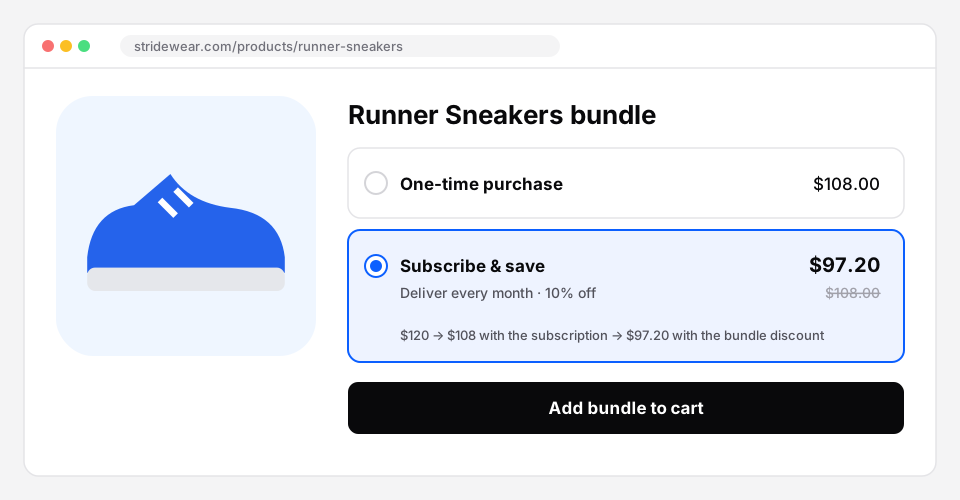 Subscribe & save in a bundle, with both discounts shown.
How the price is worked out
The two discounts stack:
- The subscription’s own discount applies first, such as 10% off for subscribing.
- The bundle discount comes on top, such as another 10% off the bundle.
From a real test order: sneakers at $120 became $108 with the subscription discount, and $97.20 with the bundle discount on top.
The bundle discount carries over to every renewal, not just the first order.
Which subscription apps work
Bundles work with Shopify’s standard subscription plans. They were tested with Shopify Subscriptions, Shopify’s free app. Apps such as Recharge, Seal, Appstle and Loop use the same standard plans.
Setting it up
- Make sure your products are in a plan in your subscription app.
- Open the bundle and, in the Design step, turn on Offer “Subscribe & save”.
- Check the setup checklist in the editor. It shows which products still need a subscription plan, or need a weight (Shopify Subscriptions uses it to charge delivery on every order), with a link to each product. When everything is ready it says “Ready for subscriptions”.
Which bundle types can be subscriptions
- Frequently bought together, quantity breaks, volume discounts, Buy X Get Y, and fixed + add-ons;
- fixed bundles, mix & match, build your own, gift boxes and variety packs when sold as a discount on the items.
Bundles sold as their own product (one cart line) can’t be subscriptions. That’s a Shopify rule.
Subscription bundle ideas
- Coffee or tea: a variety pack of 3 blends, every month.
- Supplements: a quantity break with “Buy 3” on subscribe & save.
- Pet food and treats: a fixed bundle that renews every 4 weeks.
- Skincare routine: cleanser, serum and moisturiser, every 6 weeks.
- Digital: a monthly course or template bundle, with no shipping asked.
Tips
- Keep the first box simple. A fixed bundle or a variety pack is easier to say yes to than a long builder.
- Show both prices. Shoppers subscribe when the saving against one-time is clear.
- Check the weight of every product. Without it, Shopify Subscriptions can’t charge delivery on renewals.
- Test the offer. An A/B test can compare a bigger bundle discount against a smaller one, judged by revenue per visitor.
Try it on your store
- Nanflows Bundles for Shopify has subscriptions on bundles, with A/B tests and bundle pages. Every feature is on the Free plan up to $500 of bundle sales a month; paid plans are $19, $39 and $79 a month, with a 15-day trial.
- More on the Shopify bundle app and Shopify product bundles.
FAQ
Do I need a subscription app?
Yes. Bundles add the choice and the discount; your subscription app handles the schedule, renewals and the customer’s account.
Does the bundle discount apply to renewals?
Yes. It’s set to carry over to every renewal.
Is it on the Free plan?
Yes. Subscriptions in bundles are on every plan, including Free.