Create high-converting popups without the complexity.
Nanflows
Get started
WooCommerce sliding cart · WordPress plugin

Nanflows sliding cart

A cart that slides in when something is added, so shoppers keep browsing instead of leaving for the cart page.

Free version
Version
1.0.0
Updated
1 Oct 2026
Refund
14 days
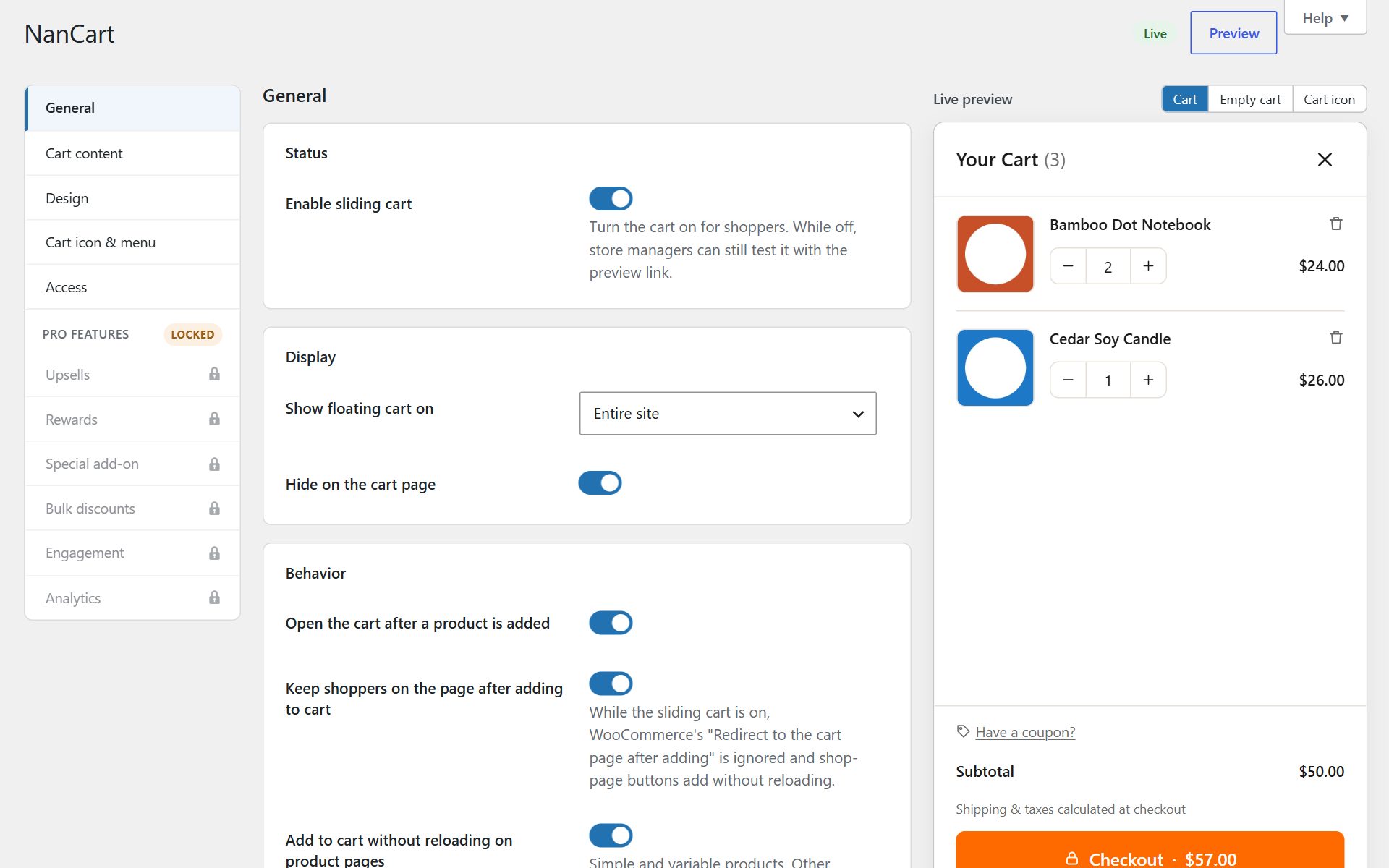
NanCart settings with the live cart preview
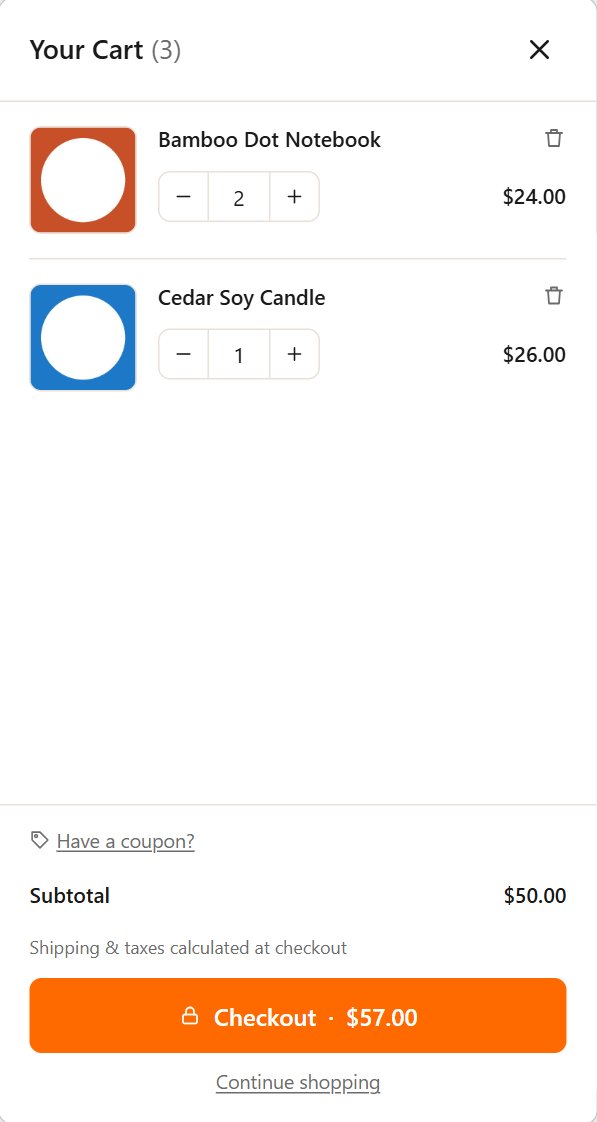
NanCart settings with the live cart preview on a phone

Overview

What it does

Nanflows Sliding Cart replaces the jump to the cart page with a clean cart that slides in from the side. Shoppers see what they added at once, change quantities or options, apply a coupon and go straight to checkout, all without a page reload.

It is built to be light: one small stylesheet and one small script, loaded only where the cart is shown, with no jQuery UI, no icon fonts and no calls to outside services.

Pro turns the cart into a place that raises order value: upsells, a rewards progress bar, bulk discounts, gift wrap and a sticky add-to-cart bar, with analytics to show what works.

Use it for

One plugin, every kind of cart

  • WooCommerce sliding cart

    The cart slides in on add to cart, without a page reload.

  • Side cart

    Replace the trip to the cart page with a cart at the side of the screen.

  • Cart drawer

    A drawer that opens from the menu, a floating button or any cart link.

  • Mini cart

    The Mini-Cart block and your theme’s cart icon open the drawer instead of a small dropdown.

  • Cart upsells

    Upsells and cross-sells of what is in the cart, as a carousel or slider. Pro.

  • Free shipping bar

    Show how far the shopper is from free shipping, from the guest’s own location. Pro.

  • Rewards

    Milestones for free shipping, a discount coupon or a free gift that apply themselves. Pro.

  • Bulk discounts

    Buy more, pay less per item, with the tiers shown in the cart. Pro.

Features

What Pro adds

01

Upsells and cross-sells

Recommend the upsells and cross-sells of what is in the cart, as a carousel or a slider. Edit every product's linked products from one screen.

02

Rewards progress bar

Free shipping, discount coupon and free gift milestones that apply themselves as the cart grows. Guests get the right free-shipping amount from their location.

03

Special add-on

A one-click toggle for one product you choose, such as shipping protection or a warranty.

04

Bulk (quantity) discounts

Buy more, get a bigger percentage off, with tiers shown in the cart. Works on tax-inclusive and tax-exclusive stores.

05

Announcement bar and countdown

A message at the top of the cart plus a cart reservation timer.

06

Order note and gift wrap

Shoppers add a note or gift wrap (with your fee) right in the cart.

07

Sticky add-to-cart bar

A bar on product pages that drives the real add-to-cart form, so options, validation and add-ons keep working.

08

Coupons and tax breakdown

Create and manage WooCommerce coupons from the cart settings, and show a tax breakdown in the cart.

09

Google Fonts

Fonts for titles and body text, with sizes and weights, loaded with font-display swap.

10

Cart analytics

Tracked orders, upsell and add-on conversion and revenue, and how many orders unlocked free shipping, discounts and free gifts.

11

Updates inside WordPress

Once your licence key is active, new versions arrive under Plugins, with email support.

Screens

A closer look

Free and Pro

Free and Pro compared

Nanflows sliding cart: free and Pro compared
FeatureFreePro
Sliding cart on add to cart, no reload✓✓
Quantities, options and remove in the cart✓✓
Coupon field, totals, express payments✓✓
Floating cart button and menu cart✓✓
Colours, layout, custom CSS, live preview✓✓
Cart/Checkout blocks, HPOS, WPML, Polylang✓✓
Upsells and cross-sells in the cart—✓
Rewards bar: free shipping, discount, free gift—✓
Special one-click add-on—✓
Bulk quantity discounts—✓
Announcement bar and reservation countdown—✓
Order note and gift wrap—✓
Sticky add-to-cart bar—✓
Create coupons, tax breakdown—✓
Google Fonts—✓
Cart analytics dashboard—✓
UpdatesWordPress.orgInside WordPress
SupportForumEmail

Pricing

Plans

Free

$0 forever

Unlimited sites · From WordPress.org

  • Cart slides in on add to cart, no page reload (simple and variable products)
  • Change quantities, remove items and switch options inside the cart
  • Sale prices struck through with a "Save 20%" badge
  • Coupon field, open or behind a link
  • Subtotal, shipping, tax and total rows
  • Checkout button with total, "View cart" and "Continue shopping" links
  • Express payment buttons from your gateway
  • Custom empty-cart message
  • Floating cart button with item count, any corner, your size and colours
  • Cart link in any menu or with a shortcode, incl. block theme headers
  • Mini-Cart block and theme cart icons open the drawer
  • Left or right side, widths, animation, colours, font and custom CSS
  • Live preview with your own products while you edit
  • Cart/Checkout blocks, HPOS, WPML, Polylang, currency switchers, cache plugins
  • Choose which roles may manage the settings
Download free

No account needed

Pro+ (yearly)

$99 / year

5 sites · Renews yearly, cancel any time

  • Everything in Free and Pro, plus
  • Use on up to 5 sites
  • Your licence
  • Move a licence to another site from your dashboard
  • 1 year of updates inside WordPress
  • Email support

14-day refund

Changelog

Recent updates

All releases
  • 1.0.0
    Maintenance release.

FAQ

Questions

Do I need the free plugin to use Pro?

Yes. Install Nanflows Sliding Cart (free) from WordPress.org first, then upload Nanflows Sliding Cart Pro and enter your licence key in its settings. Pro adds its features on top of the free plugin.

Does it work with my theme?

It works with classic and block themes. The Mini-Cart block and most theme cart icons open the drawer, and you can add a cart link to any menu or with a shortcode.

Will PayPal and other express buttons show in the cart?

Yes, when your payment plugin offers mini-cart buttons (for example PayPal’s mini-cart option). They show under the checkout button in the drawer.

Does it slow down my store?

No. It loads one small stylesheet and one small script, only where the cart is shown, with no jQuery UI, icon fonts or calls to outside services.

Does it work with the Cart and Checkout blocks, HPOS and translations?

Yes. It supports the Cart and Checkout blocks, HPOS, WPML, Polylang, currency switchers and common cache plugins.

What happens when my licence ends or I cancel the renewal?

Nanflows Sliding Cart Pro keeps working until the end of the period you paid for. After that, Pro features switch off and updates stop, but the free plugin and your settings stay. Renew any time to switch Pro back on.

Can I get a refund?

Yes. A first purchase can be refunded in full within 14 days, no questions asked. Renewals are not refunded, but you can cancel a renewal from your dashboard any time before it is charged.

Can I move my licence to another site?

Yes. Remove the site in your dashboard to free the slot, then add the new site. Every domain uses one slot, including staging and localhost.