Create high-converting popups without the complexity.
Nanflows
Get started
Nanflows Sliding Cart · WordPress plugin

WooCommerce Sliding Cart

The cart slides in the moment a shopper adds a product. They see it worked, change what they need and go to checkout, or keep shopping, without leaving the page.

From $29 / year · 14-day refund

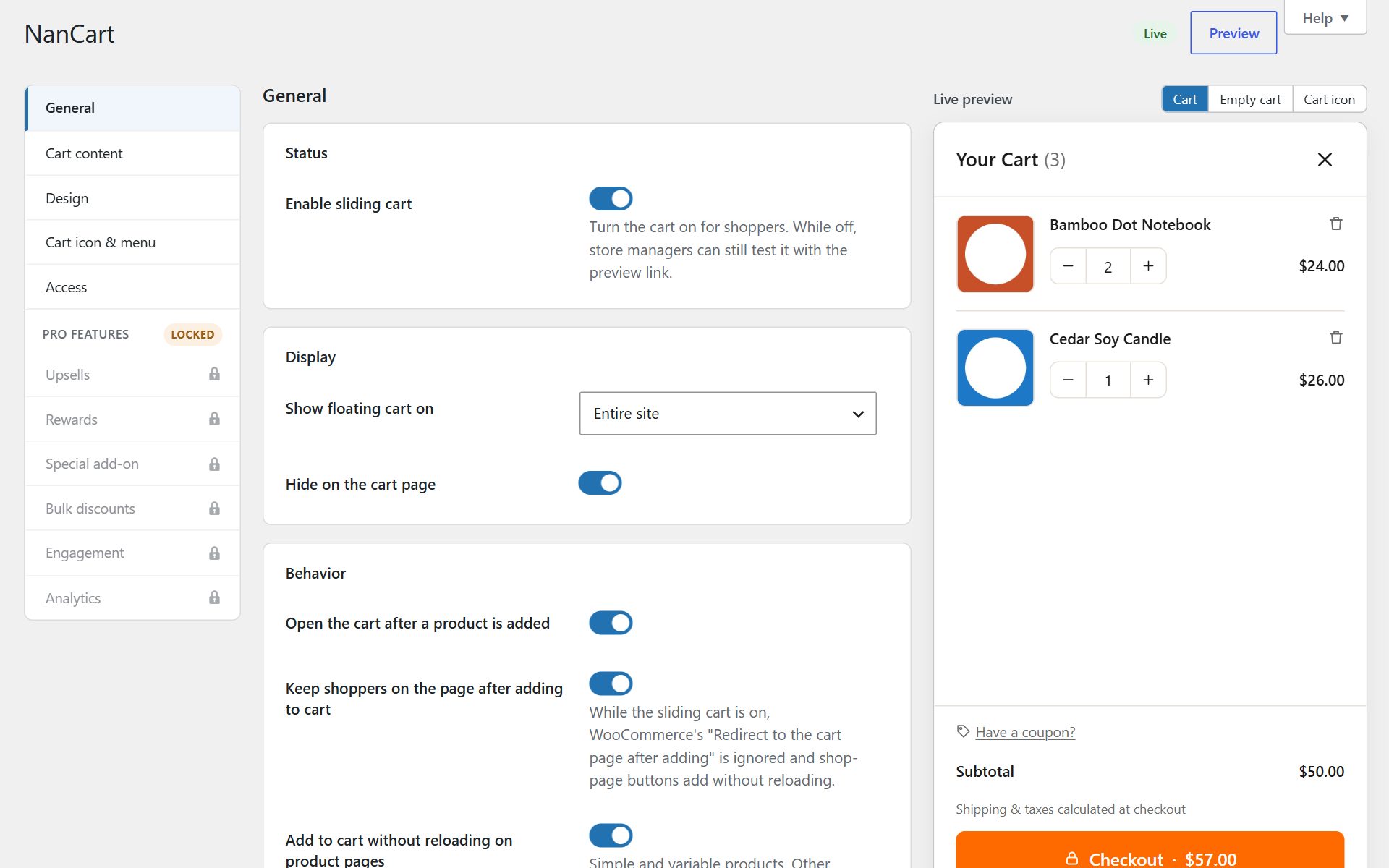
NanCart settings with the live cart preview
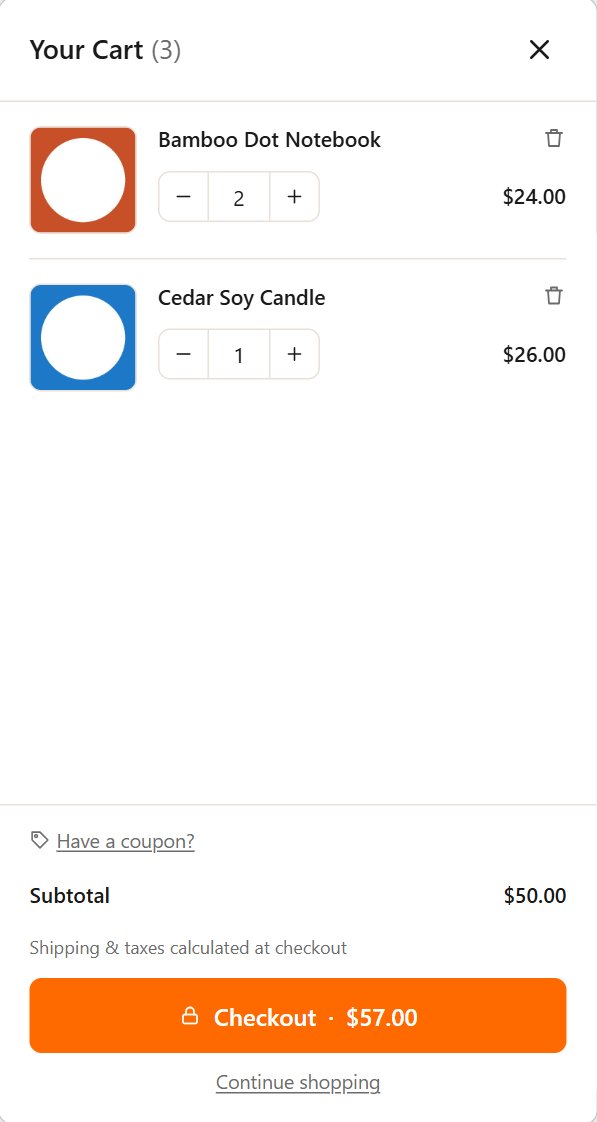
NanCart settings with the live cart preview on a phone

Overview

How it works

WooCommerce’s default flow sends shoppers to the cart page, or leaves them guessing whether the button did anything. Nanflows Sliding Cart replaces both with a cart that slides in from the side of the screen, updated without a page reload.

Everything a cart page does happens inside it: change quantities and options, remove an item, apply a coupon, see shipping, tax and the total, and go to checkout or pay with your express buttons. It is light, too: one small stylesheet and one small script, loaded only where the cart is shown.

Features

What you get with Nanflows Sliding Cart

01

Opens on add to cart

Simple and variable products, from shop pages and product pages, with no page reload.

02

A full cart inside

Quantities, options, remove, coupon field, subtotal, shipping, tax and total rows.

03

Checkout in one tap

A checkout button with the total, plus the express payment buttons your gateway offers.

04

Your look

Left or right, width, animation, colours, font and custom CSS, with a live preview of your own products.

05

Works with your stack

Cart and Checkout blocks, HPOS, WPML, Polylang, currency switchers and common cache plugins.

06

Room to grow

Pro adds upsells, a rewards bar, bulk discounts, gift wrap, a sticky add-to-cart bar and cart analytics.

Screenshots

A closer look

Use cases

Stores that get the most from it

  • Shops with many small items

    Shoppers add three or four things in a row. The cart confirms each one and gets out of the way.

  • Mobile-first stores

    No page change on a slow connection: the cart opens over the page and checkout is one tap away.

  • Stores chasing order value

    With Pro, the cart is where you show the free-shipping goal and the products that go with what is in it.

Getting started

Set it up in three steps

  1. 01

    Install the free plugin

    Add Nanflows Sliding Cart to WordPress. The cart works with the defaults straight away.

  2. 02

    Make it yours

    Pick the side, colours and what the cart shows, watching the live preview.

  3. 03

    Add Pro when you want more

    Upload Pro, paste your licence key, and switch on upsells, rewards and discounts.

Pricing

Nanflows Sliding Cart plans

All about Nanflows Sliding Cart

Free

$0 forever

Unlimited sites · From WordPress.org

  • Cart slides in on add to cart, no page reload (simple and variable products)
  • Change quantities, remove items and switch options inside the cart
  • Sale prices struck through with a "Save 20%" badge
  • Coupon field, open or behind a link
  • Subtotal, shipping, tax and total rows
  • Checkout button with total, "View cart" and "Continue shopping" links
  • Express payment buttons from your gateway
  • Custom empty-cart message
  • Floating cart button with item count, any corner, your size and colours
  • Cart link in any menu or with a shortcode, incl. block theme headers
  • Mini-Cart block and theme cart icons open the drawer
  • Left or right side, widths, animation, colours, font and custom CSS
  • Live preview with your own products while you edit
  • Cart/Checkout blocks, HPOS, WPML, Polylang, currency switchers, cache plugins
  • Choose which roles may manage the settings
Download free

No account needed

Pro+ (yearly)

$99 / year

5 sites · Renews yearly, cancel any time

  • Everything in Free and Pro, plus
  • Use on up to 5 sites
  • Your licence
  • Move a licence to another site from your dashboard
  • 1 year of updates inside WordPress
  • Email support

14-day refund

FAQ

Questions

Is the sliding cart free?

Yes. The sliding cart itself, with quantities, coupon, totals, express payments and the floating cart button, is in the free plugin. Pro adds upsells, rewards, bulk discounts and the rest.

Does it reload the page?

No. Products are added and the cart is updated in the background, so shoppers stay where they are.

Does it work with the Cart and Checkout blocks?

Yes, and with HPOS, WPML, Polylang, currency switchers and common cache plugins.

Will it slow my store down?

No. It loads one small stylesheet and one small script, only where the cart is shown, with no jQuery UI, icon fonts or calls to outside services.

Try Nanflows Sliding Cart free

Start with the free version from WordPress.org, and add Pro when you want more.

  • Free version
  • 14-day refund on Pro
  • Email support