In short: urgency (“ends Monday”) and scarcity (“only 2 left”) help shoppers decide when they are true. They backfire when they aren’t: shoppers check, and the FTC lists fake countdown timers and false low-stock messages as dark patterns. Use real deadlines, real stock counts, real shipping cut-offs and genuine former prices. In WooCommerce, the tools for that are built in or come from plugins you may already have, such as Nanflows Sliding Cart for an announcement bar in the cart.
Why urgency works at all
Most shoppers who add something to a cart don’t buy that day. Some compare prices, some wait for payday, some forget. A true deadline gives them a reason to decide now instead of later, and a true stock level tells them waiting has a cost. Both are useful information.
The problem is that both are easy to fake, and many stores do. A shopper who sees “only 3 left” on every product, or a timer that starts again when they reload the page, stops believing any of it, on your store and the next one.
Honest urgency and the fake kind
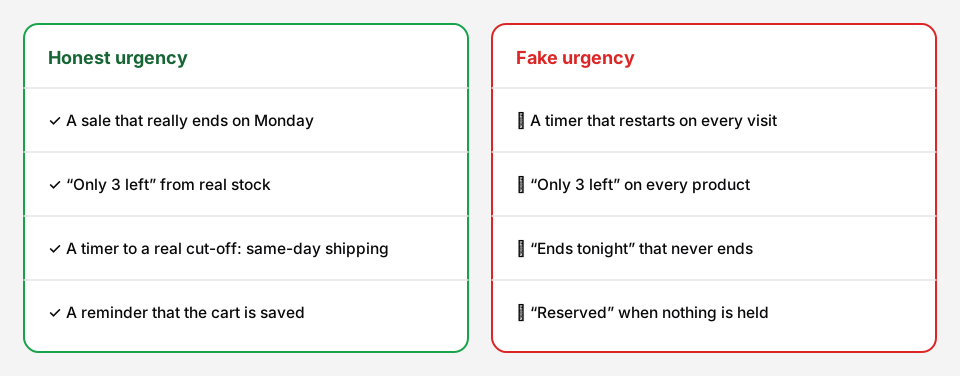 The test: would the message still be true if the shopper came back tomorrow?
| Tactic | Honest version | Fake version |
|---|---|---|
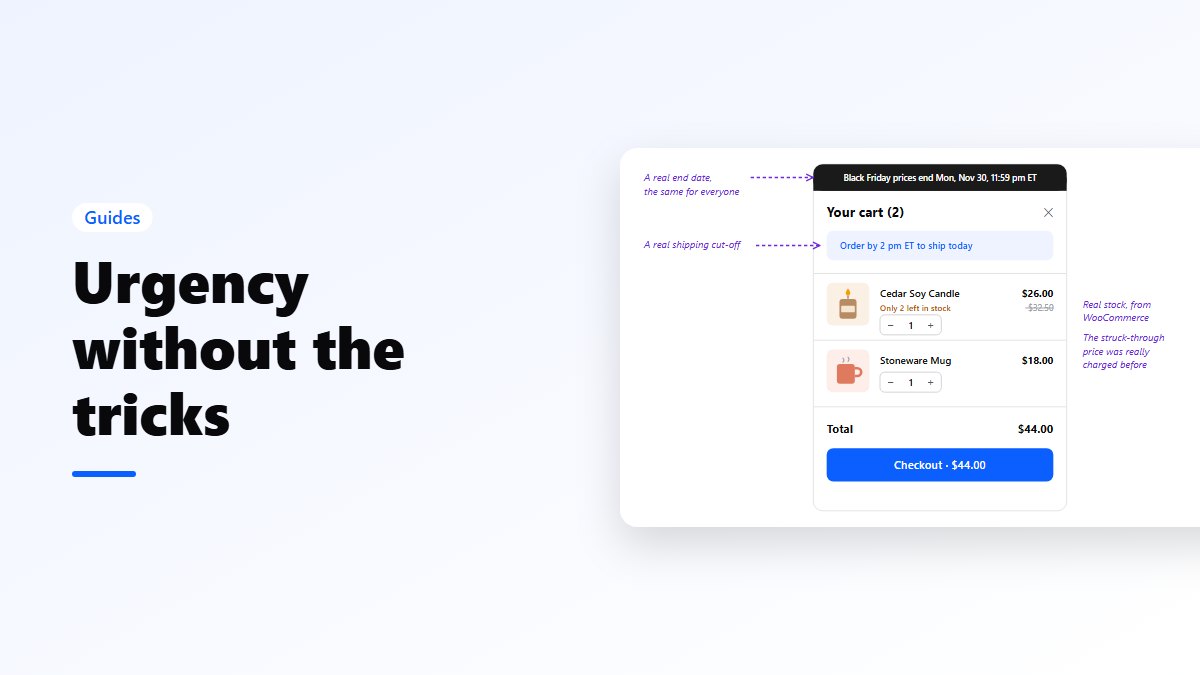
| Sale deadline | “Black Friday prices end Mon, Nov 30, 11:59 pm ET”, and they do | “Ends tonight” every night |
| Countdown timer | Counts down to the real end of a sale, the same for everyone | Starts when the visitor arrives and restarts on reload |
| Low stock | “Only 2 left” from your real stock count | “Only 3 left” on every product |
| Shipping cut-off | “Order by 2 pm ET to ship today”, if you do | A cut-off you don’t keep |
| Former price | A struck-through price you really charged | A “was” price that never existed |
| Popularity | “12 sold this week”, from your orders | Random “someone in Ohio just bought this” pop-ups |
What the rules say
This isn’t legal advice, but the direction is clear in the US and the EU.
- FTC (US). The FTC’s 2022 staff report Bringing Dark Patterns to Light lists false countdown timers and false scarcity claims, such as invented low stock or invented demand, among the design tricks it considers deceptive. The FTC Act’s ban on deceptive practices applies to them like any other false claim.
- FTC Guides Against Deceptive Pricing (US). A former price shown as a comparison must be one you actually offered in good faith for a reasonably substantial period. A “was $80, now $40” where the product never sold at $80 is the classic example.
- EU. The Unfair Commercial Practices Directive bans falsely stating that a product or price is available only for a very limited time to rush a decision. Under the EU price rules, an announced price reduction has to show the lowest price of the previous 30 days as the former price.
If you sell to Europe as well as the US, the EU’s 30-day rule is the stricter one, so it’s simplest to follow it everywhere.
Honest urgency in WooCommerce
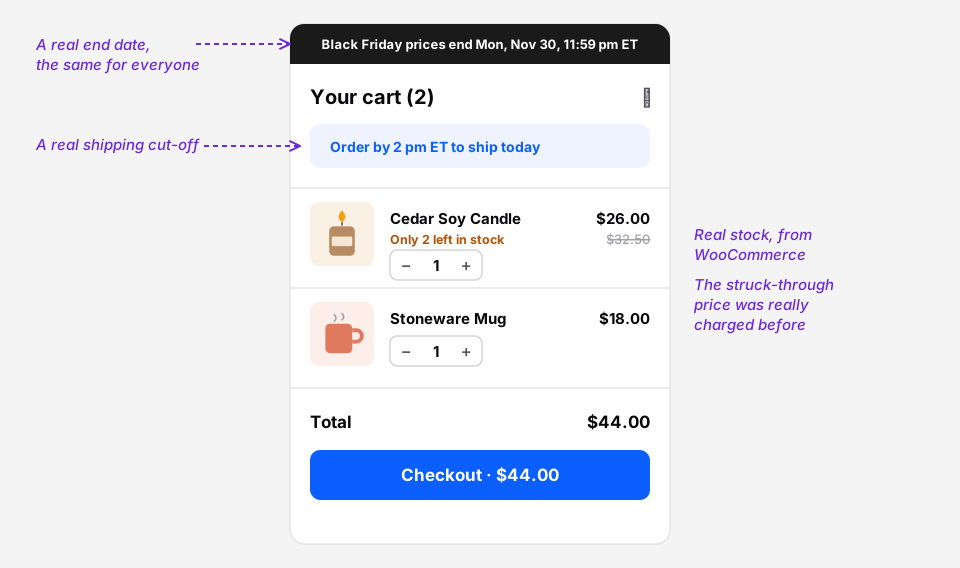 Every message here is true for every shopper who reads it.
Real sale deadlines. On each product, click Schedule next to the sale price and set the dates. The sale ends when you said it would, without you staying up to end it. For bundles, Nanflows Bundles Pro has Sell from and Sell until dates in your store’s time zone.
Say the deadline once, clearly. With Nanflows Sliding Cart Pro, the announcement bar at the top of the side cart (NanCart → Settings → Engagement) is a good place for “Black Friday prices end Monday, Nov 30, 11:59 pm ET”. Write the time zone; your customers live in several.
Real low stock. Under WooCommerce → Settings → Products → Inventory, set a low stock threshold and the stock display format to “Only show quantity remaining in stock when low”. Product pages then say “Only 2 left in stock” when it’s true, and nothing when it isn’t.
Real shipping cut-offs. If you ship same day before a set time, say so on product pages and in the cart. In December, publish your last order dates for Christmas delivery for each shipping method. That is real urgency, and shoppers are grateful for it.
Genuine former prices. Only strike through a price you charged before, for a meaningful period. If you sell in the EU, use the lowest price of the last 30 days.
About cart countdown timers
Cart timers that start when someone adds a product (“your cart is reserved for 10:00”) are popular, but be careful with the wording. WooCommerce doesn’t hold stock for items in a cart. Its Hold stock (minutes) setting only holds stock for orders waiting for payment. So unless something really is held, “reserved” isn’t true.
Nanflows Sliding Cart Pro has a cart countdown under NanCart → Settings → Engagement. It never empties the cart, and its message is yours to write. If you use it, write a message that is true for every shopper who sees it, or leave it off and put a real deadline in the announcement bar instead. We’d rather you do that than lose a customer’s trust over ten minutes.
A quick self-check
Before you publish any urgent message, ask:
- Is it true right now?
- Will it still be true if the shopper comes back tomorrow?
- Is it the same for every shopper?
- Could you show a customer, or a regulator, the data behind it?
Four yeses, and it’s honest urgency. Anything else, change it.
Get it
- Free side cart: Nanflows Sliding Cart on WordPress.org.
- Pro: an announcement bar in the cart, a free shipping bar and rewards on the Nanflows Sliding Cart page, $39 a year for one site.
- Bundles with real end dates: Nanflows Bundles Pro has sell-from and sell-until dates for each bundle.
- Related: the Black Friday checklist and how to reduce cart abandonment.
FAQ
Are countdown timers illegal?
A countdown to a real deadline is fine. A timer that misleads, for example one that restarts for each visitor or ends without the offer ending, is a deceptive practice under US and EU consumer law. The FTC names false countdown timers as a dark pattern.
What is false scarcity in ecommerce?
Saying a product is in short supply or in high demand when it isn’t, such as “only 3 left” shown on every product, or invented “just bought” notifications.
How do I show “only X left in stock” in WooCommerce?
In WooCommerce → Settings → Products → Inventory, set a low stock threshold and choose “Only show quantity remaining in stock when low” as the stock display format. Product pages then show the real number when stock is low.
Does WooCommerce reserve stock for items in the cart?
No. WooCommerce’s Hold stock setting holds stock for orders that are waiting for payment, not for carts. Anyone can buy the last item while it sits in another shopper’s cart.
Can I show a “was” price on sale items?
Yes, if it’s a price you genuinely charged for a reasonable period. In the EU, the former price must be the lowest price of the previous 30 days.