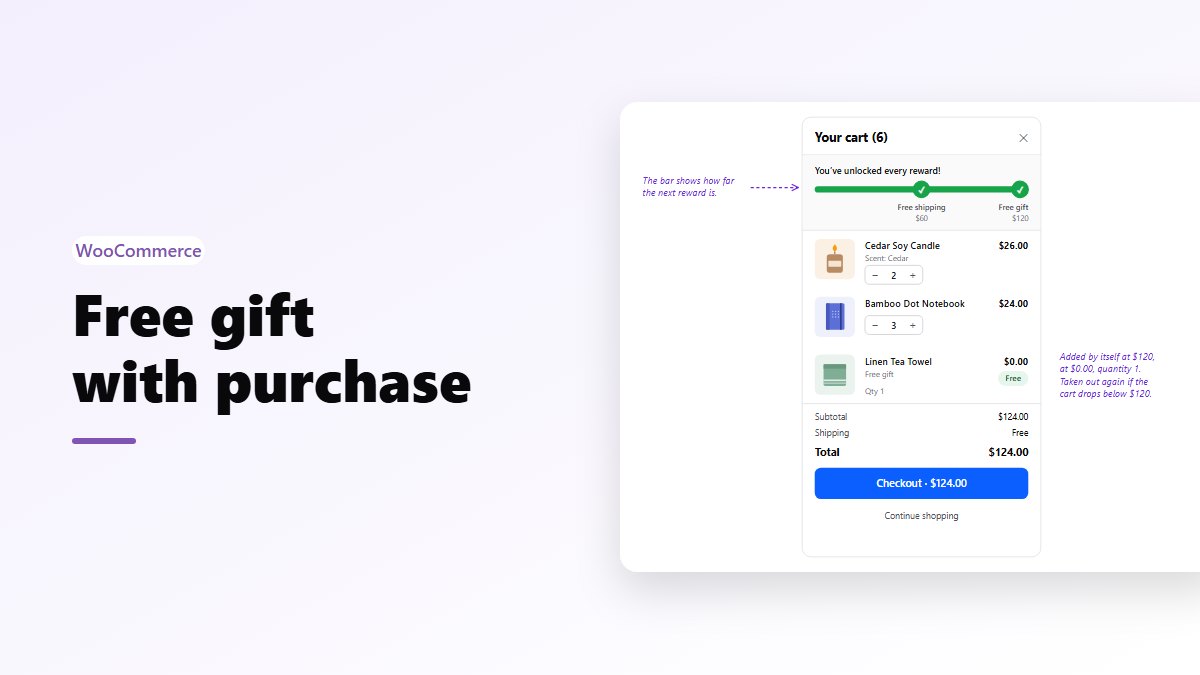
In short: a free gift with purchase (GWP) adds a product to the cart for free once the order reaches an amount, like “free tote bag on orders over $100”. Pick a gift that costs you little but has a clear price, and set the amount 20 to 40% above your average order. WooCommerce coupons can’t add a product by themselves. Nanflows Sliding Cart Pro adds the gift at $0.00 when the cart reaches the amount, shows progress towards it, and takes the gift out again if the cart drops below.
Why a gift can beat a discount
A discount costs you its full face value. A gift costs you what you paid for it.
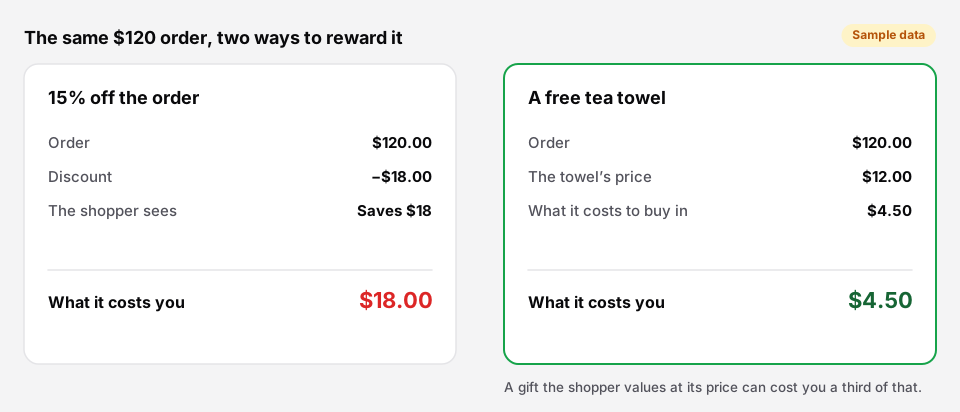 Sample numbers. Use your own costs.
On a $120 order, 15% off is $18 out of your margin. A tea towel you sell for $12 and buy in for $4.50 costs you $4.50, and the shopper still sees a $12 gift. Gifts also feel different: a discount is a smaller number on the receipt, a gift is something in the box.
There are trade-offs. A gift only works if shoppers want it, and it takes stock and shipping weight. Use the gift when you have a product that fits; use a discount when you don’t.
Choosing the gift
A good gift is:
- Cheap for you, with a real price. Shoppers judge it by the price on your site. If it has no price anywhere, it’s worth what they guess.
- Related to what they buy. A candle store giving matches, a coffee store giving a scoop, a skin care store giving a travel size. Unrelated gifts look like clearance.
- Small and light, so it doesn’t push the parcel into a higher shipping rate.
- In stock in depth. Running out halfway through a promotion means some orders get the gift and some don’t.
- Not your bestseller. Giving away the product people would buy anyway teaches them to wait for the offer.
Some ideas by store type:
| Store | Gift | Spend |
|---|---|---|
| Coffee | A 4 oz sample bag of a new roast | $60 |
| Candles and home | A matchbox or a mini candle | $75 |
| Skin care | Travel sizes of a second product | $80 |
| Apparel | Socks or a tote bag | $100 |
| Pet supplies | A bag of treats | $50 |
| Stationery | A sticker sheet or a pen | $40 |
Setting the amount
Start from your average order value. In WooCommerce it is under Analytics → Orders. Then:
- Set the gift amount 20 to 40% above it. If your average order is $85, try $110 or $120. Far enough to change behavior, close enough that many orders are one item away.
- Keep it above your free shipping amount, if you have one. Free shipping first, then the gift, gives shoppers two steps instead of one big jump.
- Check the gap. If shoppers need $25 more, you need products around $15 to $30 to fill it.
Run it for a few weeks and look at the average order and the number of orders together. If the average rose and orders held, keep it.
Setting it up in WooCommerce
WooCommerce on its own can’t add a free product to the cart. A coupon can give a discount, but not a product. You need a plugin.
With Nanflows Sliding Cart Pro, go to NanCart → Settings → Rewards, turn on Enable rewards, and add a free gift milestone with the amount and the gift product.
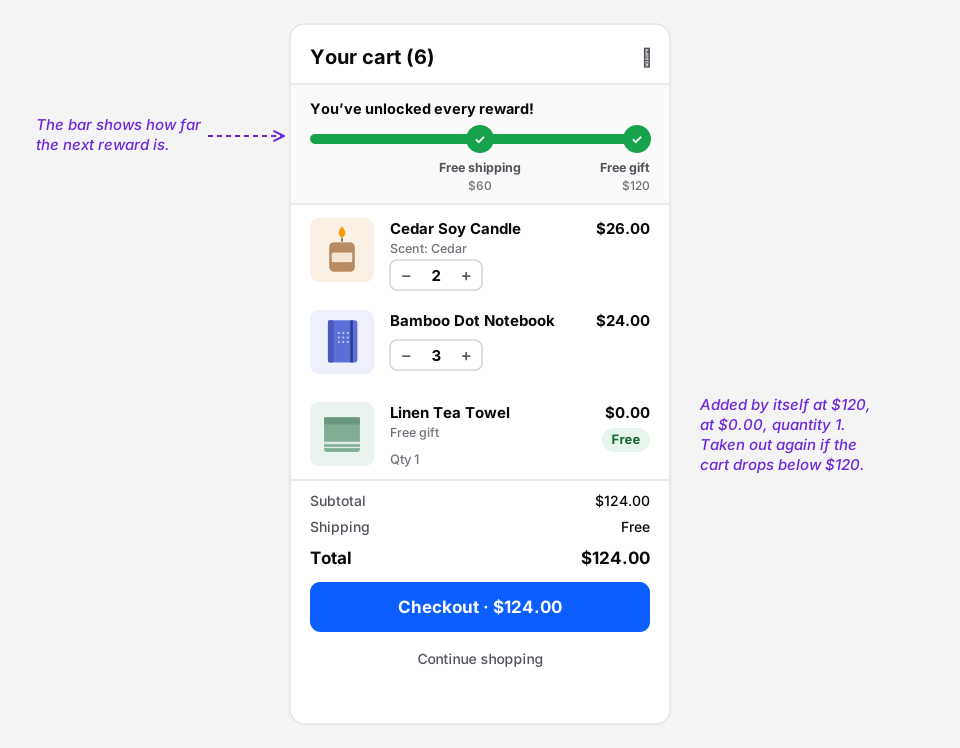 The gift goes in as a normal cart line at $0.00.
What happens in the cart:
- Progress shows at the top of the side cart, so shoppers see how far they are from the gift.
- At the amount, the gift is added by itself, priced at $0.00, quantity 1.
- If the cart drops below the amount, the gift is taken out.
- Shoppers can’t remove it, unless you allow it with Let shoppers remove free gifts. If they remove it, it isn’t added back during that visit.
- Progress is measured on the cart subtotal, or on the subtotal after coupons if you choose that, so a coupon doesn’t count towards the gift.
- Combine it with free shipping and a discount as milestones on the same bar. Two or three is plenty.
The gift is a real line on the order, so WooCommerce reduces its stock like any product and you can see in your orders how often it went out.
Write the rules down
Put the rules where shoppers can read them, on the product or a promotions page:
- One gift per order.
- While stocks last, and what happens if they run out.
- What happens on a return. Most stores say: if the return takes the order below the amount, the gift comes back too, or its price is taken off the refund. Pick one and say it.
Get it
- Free side cart: Nanflows Sliding Cart on WordPress.org. The free gift milestone is in Pro.
- Pro: rewards (free shipping, discounts and free gifts), upsells and cart analytics on the Nanflows Sliding Cart page, $29 a year for one site or $99 for five.
- Gift sets instead? To sell a box of products as a gift, see custom gift boxes in WooCommerce.
- Related: free shipping progress bars and how to increase average order value.
FAQ
How do I add a free gift to orders over a certain amount in WooCommerce?
WooCommerce alone can’t add products to the cart. Use a plugin: with Nanflows Sliding Cart Pro, add a free gift milestone under NanCart → Settings → Rewards with the amount and the product. It is added at $0.00 when the cart reaches the amount and removed if the cart drops below it.
Is a free gift better than a discount?
Often, when you have a gift that costs you little and has a clear price. A 15% discount on a $120 order costs $18; a $12 gift that costs you $4.50 costs $4.50. A discount is better when no product makes a good gift.
What should the free gift threshold be?
About 20 to 40% above your average order value, and above your free shipping amount if you have one. Make sure you sell products that fill the gap.
Does the free gift reduce stock in WooCommerce?
Yes. With Nanflows Sliding Cart Pro the gift is a normal order line at $0.00, so WooCommerce reduces its stock and the gift shows on the order.
Can customers remove the free gift?
Only if you allow it. Nanflows Sliding Cart Pro has a setting for that; once a shopper removes the gift, it isn’t added again during their visit.