In short: WooCommerce doesn’t send abandoned cart emails by itself. You need a plugin or an email service; MailPoet’s free plan and the free Cart Abandonment Recovery plugin both do it. A good place to start is three emails: about an hour after, the next day, and two or three days later, with any discount kept for the last one. You can only email shoppers whose address you have, so ask for the email first at checkout.
How many carts are abandoned?
Baymard Institute’s average across 50 studies is 70.22%: about seven in ten carts never become orders. Many of those shoppers were only browsing. The rest left for reasons you can fix, and a reminder brings some of them back.
Fix the leaks first, though. The top reasons shoppers give are extra costs that are too high (40%), slow delivery (20%) and not trusting the site with card details (19%). An email can’t fix a shipping cost that surprised someone. See how to reduce cart abandonment in WooCommerce.
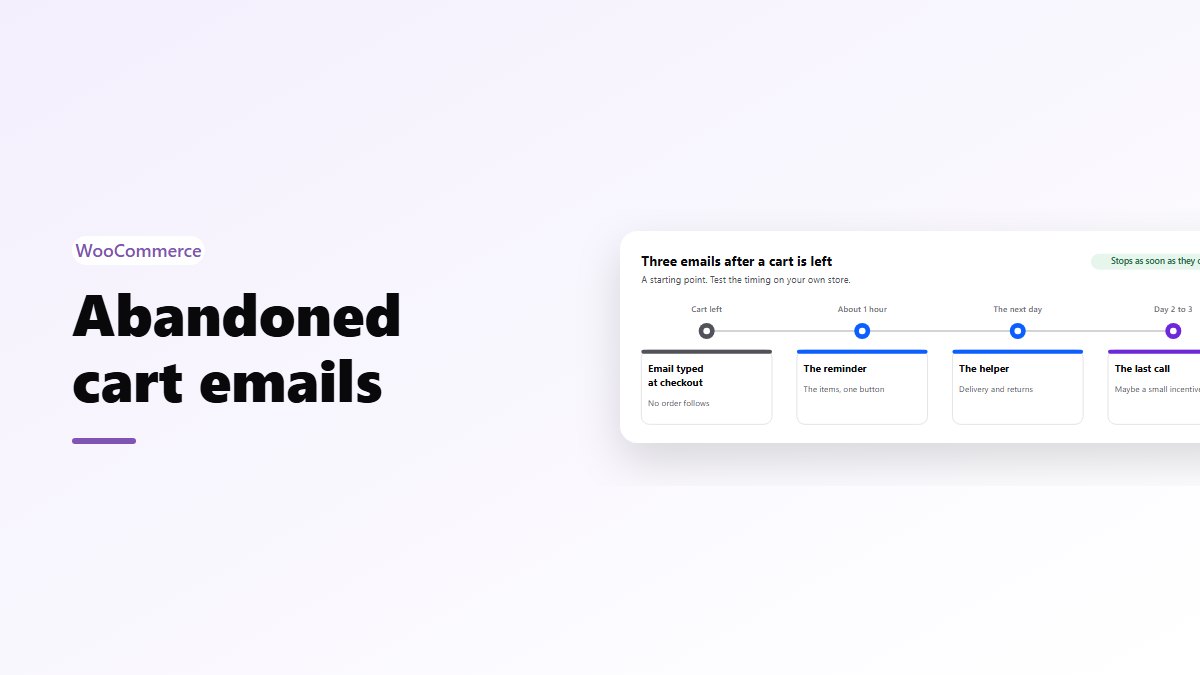
How abandoned cart emails work
- The shopper types their email at checkout, or is logged in.
- The tool saves their cart against that address.
- If no order follows, it waits and sends the first email.
- The link in the email brings them back to the same cart.
- As soon as they order, the remaining emails stop.
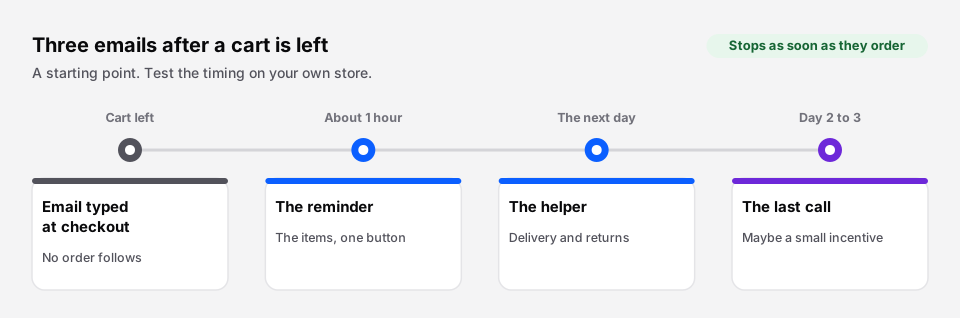 A starting point. Test the timing on your own store.
You can only email who you know
A shopper who leaves from the product page or the cart, without ever typing an email, can’t be emailed. That is most abandoned carts. Two things help:
- Ask for the email first at checkout. WooCommerce’s Checkout block starts with the email, under Contact information. In the classic checkout it sits lower down, among the billing fields, so many shoppers leave before they reach it.
- Make accounts optional but useful. Logged-in customers can always be reminded. Guest checkout should stay, because forced accounts are one of the top reasons people leave.
The tools
| Tool | Cost | Good for |
|---|---|---|
| MailPoet | Free plan includes abandoned cart emails | Stores that want newsletters and cart emails in WordPress |
| Cart Abandonment Recovery (by the CartFlows team) | Free plugin | Cart emails only, set up in minutes |
| AutomateWoo | Paid, from WooCommerce.com | Complex rules, follow-ups and loyalty emails |
| Klaviyo, Omnisend and similar | Free tiers, then by list size | Stores that already use a dedicated email service |
Whichever you choose, send from your own domain with proper email authentication, or the reminders end up in spam.
What to send
| When | What it says | Discount? | |
|---|---|---|---|
| 1. The reminder | About 1 hour after | “You left something behind,” with the items and one button | No |
| 2. The helper | The next day | Answers the usual doubts: delivery time, returns, reviews | Usually no |
| 3. The last call | 2 to 3 days after | The cart is still there; maybe a small incentive | Optional, small |
Keep the discount for the third email, if you use one at all. Shoppers who learn that leaving a cart brings a coupon will start leaving carts on purpose.
What to write
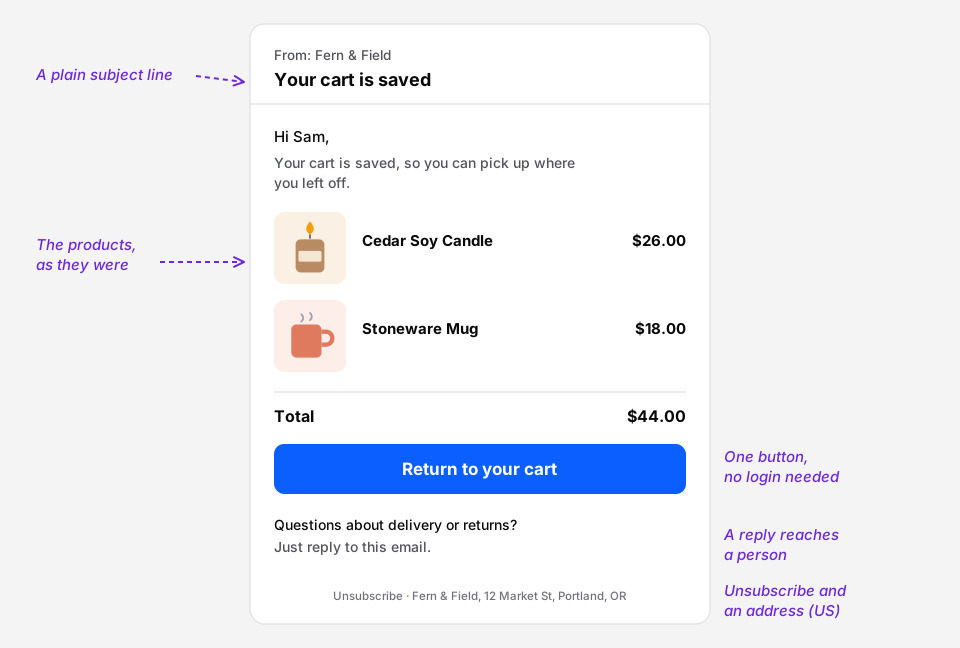 Short, about the cart, and easy to act on.
- Subject lines that sound like a person: “Your cart is saved,” “Still thinking about the cedar candle?”, “Questions about your order?”
- Show the products, with pictures and prices, exactly as they were.
- One button, “Return to your cart”, that opens the cart without asking them to log in.
- Answer one doubt in the second email: delivery dates, the returns policy, or a short review.
- A real reply-to address. Some people answer with the question that stopped them. That reply is a sale.
The consent rules
- United States: under CAN-SPAM, a reminder that promotes your products is a commercial email. It needs a working unsubscribe link and your physical address, and an unsubscribe must be honored.
- EU and UK: marketing emails generally need consent. Whether a cart reminder counts as marketing is debated, so the safe course is to send reminders only to shoppers who ticked a box agreeing to emails, or to take advice for your store.
Wherever you sell, say at checkout that you may email a reminder, and make the unsubscribe link easy to find.
Make coming back easy
The email brings the shopper back. What they find decides whether they stay. A cart that opens on the page they land on, with the coupon field and express payment buttons in it, removes one more step. The free Nanflows Sliding Cart does that, and Pro’s free shipping bar shows how close they are to free delivery, which is one of the things that stopped them in the first place.
Get it
- Free: Nanflows Sliding Cart on WordPress.org: a side cart with the coupon field, totals and express payment buttons.
- Pro: a free shipping bar, rewards and cart analytics on the Nanflows Sliding Cart page, $39 a year for one site.
- Related: how to reduce cart abandonment and free shipping bars.
FAQ
Does WooCommerce send abandoned cart emails?
No, not by itself. You need a plugin such as MailPoet or Cart Abandonment Recovery, which both have free versions, or an email service with a WooCommerce integration.
When should I send an abandoned cart email?
A common starting point is about an hour after the cart is left, then the next day, then two or three days later. Test the timing on your own store, because it depends on how long your customers usually take to decide.
How many abandoned cart emails should I send?
Two or three. The first catches people who were interrupted, the second answers doubts, and the third is a last reminder. More than that tends to annoy people more than it sells.
Should abandoned cart emails include a discount?
Not in the first email. Keep any discount small and for the last email, if you use one. If every abandoned cart gets a coupon, some shoppers will abandon carts on purpose to get one.
Are abandoned cart emails legal under GDPR?
They can be, but in the EU and UK marketing emails generally need consent, and whether a reminder counts as marketing is debated. The safe course is to send them only to shoppers who agreed to emails, or to get advice for your store.