In short: a quantity break discounts more units of one product (“buy 3 of this, save 10%”). A volume discount counts any mix of several products towards the tier (“any 5 items, save 15%”). Use quantity breaks for one product people restock, and volume discounts when the range is interchangeable. Both work on Shopify and WooCommerce.
“Buy more, save more” comes in two forms, and the names are often mixed up. Here’s what each one is, which products suit it, and how to set the tiers on Shopify and WooCommerce.
Quantity breaks: more of the same product
A quantity break makes one product cheaper the more of it the shopper buys:
- Buy 1: full price
- Buy 2: 10% off
- Buy 3: 15% off
- Buy 5: 25% off
The tiers usually show as tappable boxes next to the Add to cart button. The shopper taps one, sees the price and the saving, and adds that many.
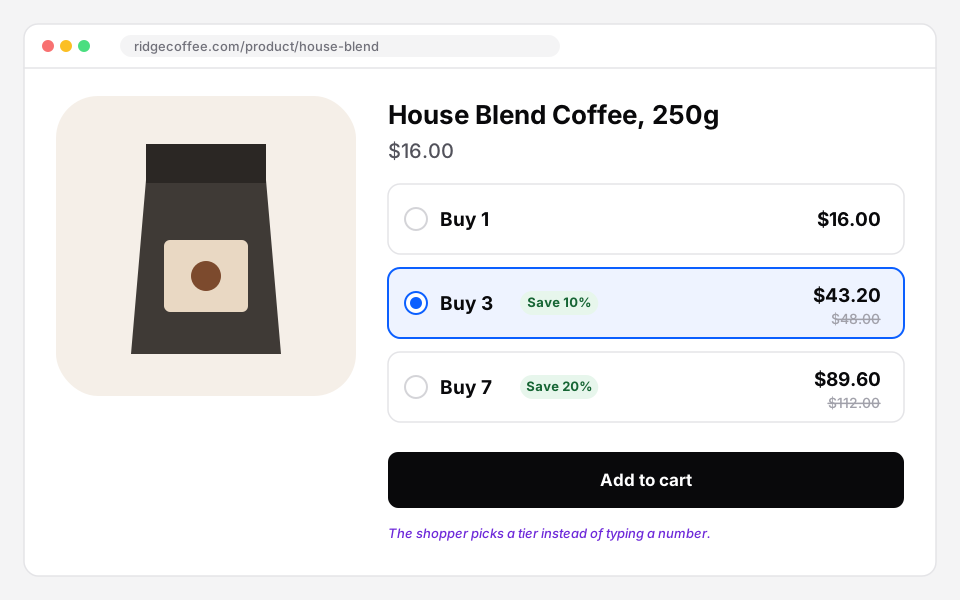 A quantity break: one product, three tiers.
Best for: products people use up or buy several of anyway: coffee, supplements, socks, candles, cosmetics, filters.
Volume discounts: any mix, counted together
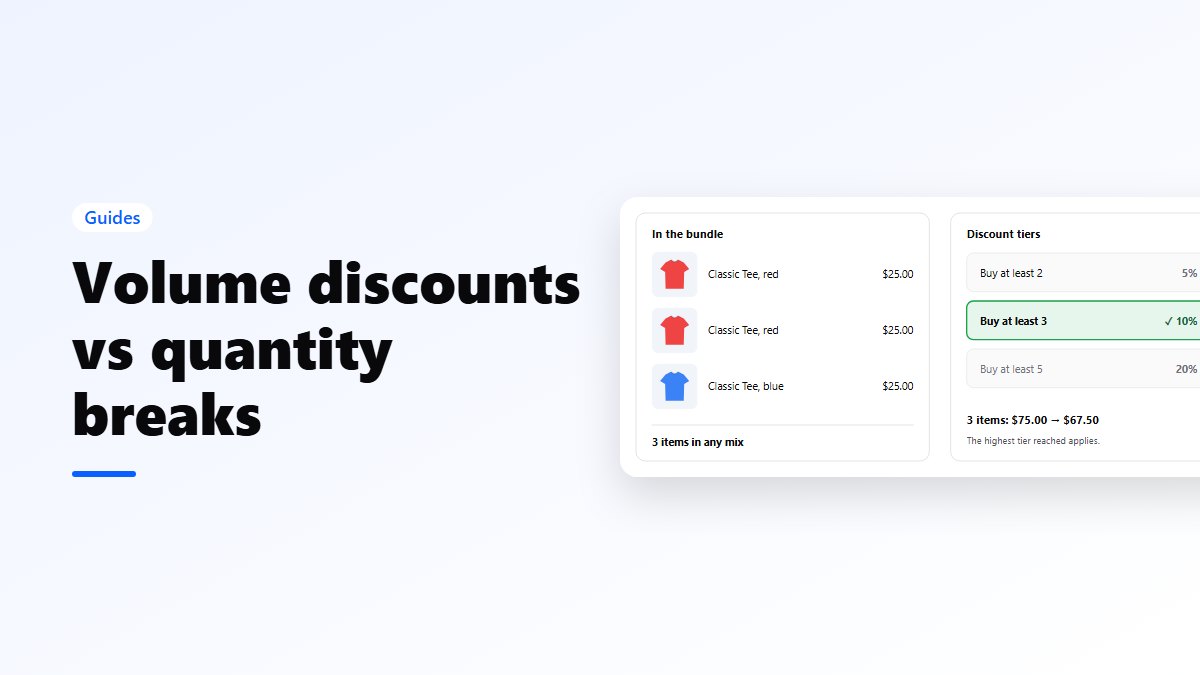
A volume discount counts every item from a list together, whatever the mix:
- any 3 items: 10% off
- any 5 items: 20% off
The shopper might take 2 T-shirts and 1 hoodie, and still reach the 3-item tier. They see which tier they’ve reached and how many more unlock the next.
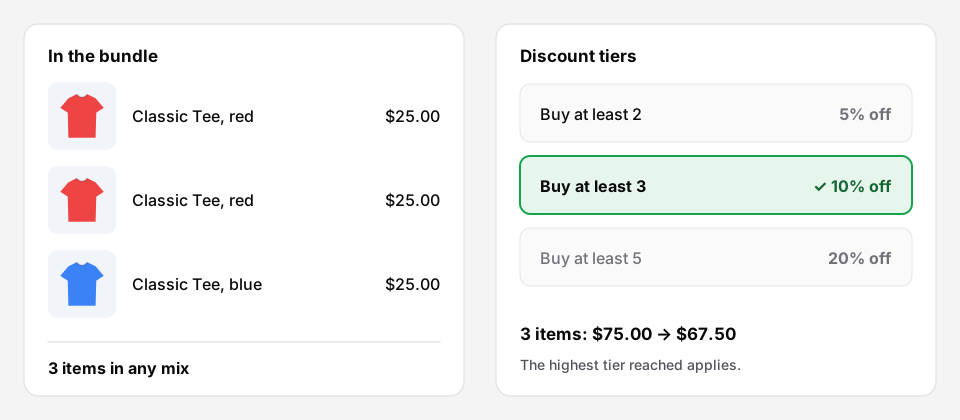 A volume discount: any mix counts towards the tier.
Best for: ranges where shoppers want variety: T-shirts in any colour, cosmetics, snacks, office supplies.
Which one to choose
- Shoppers buy several of one thing: quantity break.
- Shoppers buy several different things from a range: volume discount.
- You want the saving to grow with the whole cart, not one product: a cart-wide bulk discount.
Many stores use both: quantity breaks on their best consumables, and a volume discount across a range.
How to set the tiers
- Start with 2 or 3 tiers. More than four is hard to read.
- Make the first step easy. The jump from 1 to 2 should feel worth it.
- Make the best tier a stretch, not a surprise. If most orders have 2 items, a tier at 3 is a good nudge; a tier at 10 is decoration.
- Know your margin at every tier. Use percentages for products with different prices, amounts for a single product.
- Show the next tier. “Add 1 more to save 15%” moves people more than a table.
On Shopify
Nanflows Bundles for Shopify has both as separate bundle types:
- Quantity break: tiers with a minimum quantity and a discount, as a percentage or an amount (2+ = 10% off, 3+ = 15% off, 5+ = $20 off). One setup can show on products you pick, whole collections or every product.
- Volume discount: the products in the offer and tiers by total items, with search and filters for long lists. It can have a page of its own.
Both work with subscriptions, A/B tests and digital products, on every plan. See volume discounts on Shopify.
On WooCommerce
There are two ways, and you can use either one:
- On the product page, with Nanflows Bundles Pro: a volume bundle shows each tier with its price, so the shopper picks the quantity with the saving in view: buy 2 for 5% off, 3 for 10%, 5 for 20%.
- In the cart, with Nanflows Sliding Cart Pro: bulk quantity discounts apply as the cart grows, with the tiers shown in the cart drawer. They work with tax-inclusive and tax-exclusive prices.
See WooCommerce volume discounts.
Get set up
- Shopify: Nanflows Bundles for Shopify has quantity breaks and volume discounts. See Shopify volume discounts.
- WooCommerce: Nanflows Bundles Pro has Quantity Break and Volume bundles, on top of the free Nanflows Bundles plugin. See WooCommerce volume discounts.
FAQ
Is a quantity break the same as tiered pricing?
Yes, more or less. Tiered pricing is the general idea; a quantity break applies it to one product on its page.
Do these discounts need a coupon?
No. The tier discount applies by itself when the shopper adds the quantity.
Can I run a quantity break and a bundle on the same product?
Yes. On Shopify, priority decides which bundle shows first when several match one page, and you set how many a page shows at most.