In short: a refused cash on delivery bundle costs shipping both ways on a bigger parcel. The free Nanflows Bundles plugin lets you set each WooCommerce bundle to COD and prepaid, prepaid only or COD only. Make expensive or heavy bundles prepaid only, and use Pro’s COD vs prepaid failure rate to decide with numbers instead of guesses.
In India, the Middle East, Southeast Asia and much of Latin America, cash on delivery is how a big share of people prefer to shop. Turning it off costs sales. Leaving it on for everything costs money, because some COD orders are refused at the door, and you pay shipping both ways.
Bundles make that trade-off sharper. A bundle is a bigger, heavier, more expensive parcel. A refused bundle hurts more than a refused single item.
The free Nanflows Bundles plugin lets you decide COD bundle by bundle, and Pro shows you whether COD bundles actually fail more often.
COD rules for each bundle (free)
Every bundle has a payment setting:
- Both: cash on delivery and online payment.
- Prepaid only: cash on delivery is hidden when this bundle is in the cart.
- COD only.
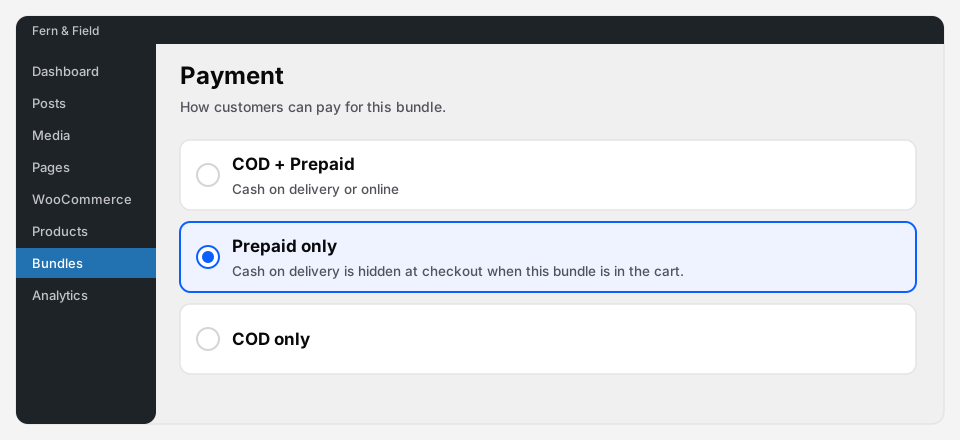 The payment setting on every bundle, in the free plugin.
Before a bundle goes live, the plugin checks that the payment method you chose is actually switched on in WooCommerce. You can’t accidentally publish a prepaid-only bundle on a shop with no online gateway.
When a cart has several bundles
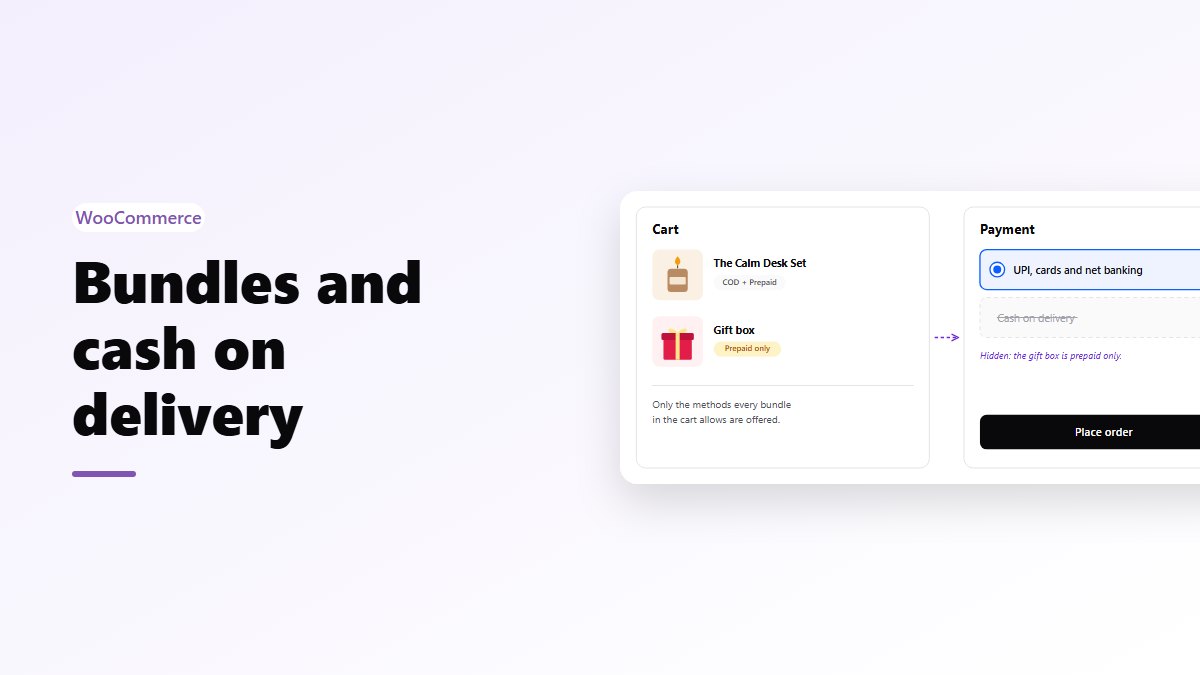
If a cart holds bundles with different rules, only the methods all of them allow are offered. A cart with one “both” bundle and one “prepaid only” bundle gets prepaid only. The shopper can still check out, and you never get a COD order for a prepaid-only bundle.
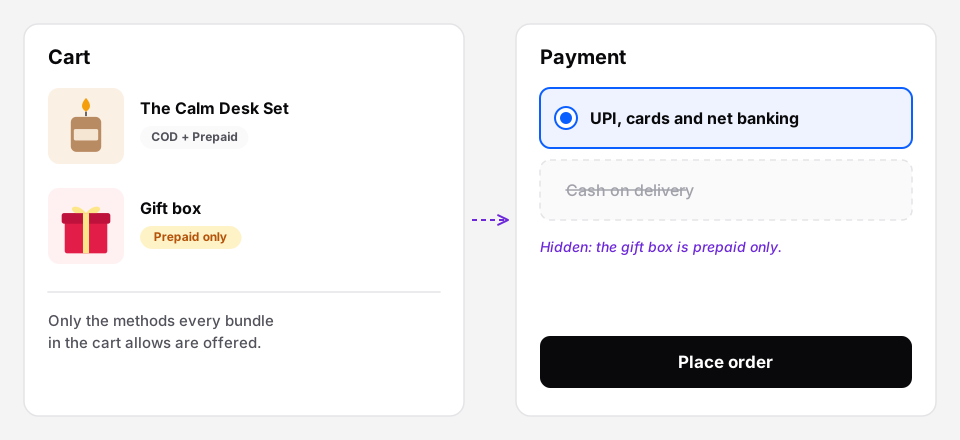 One prepaid-only bundle in the cart, so checkout offers only online payment.
Which bundles should be prepaid only?
There’s no universal answer, but a sensible starting point:
- Low-price bundles: allow COD. The risk is small and COD keeps conversion up.
- Expensive bundles: consider prepaid only.
- Gift boxes and anything personalised: prepaid only. A refused custom gift box can’t easily be resold.
- Heavy bundles: shipping both ways is what makes a refusal expensive.
Giving people a reason to prepay
Turning COD off works better when paying online feels like a good deal:
- A prepaid-only bundle at a better price than the same products bought separately on COD.
- A free gift with the prepaid bundle, using Buy X Get Y in Pro.
Measure it instead of guessing
The free plugin’s analytics split bundle orders into prepaid vs COD, by day, so you can see how much of your bundle revenue depends on COD.
Pro adds the number that actually decides the question: the COD vs prepaid failure rate. That’s the share of bundle orders that end up cancelled, failed or refunded, for each payment type. The weekly or monthly email report includes the COD failure rate too, so you notice when it moves.
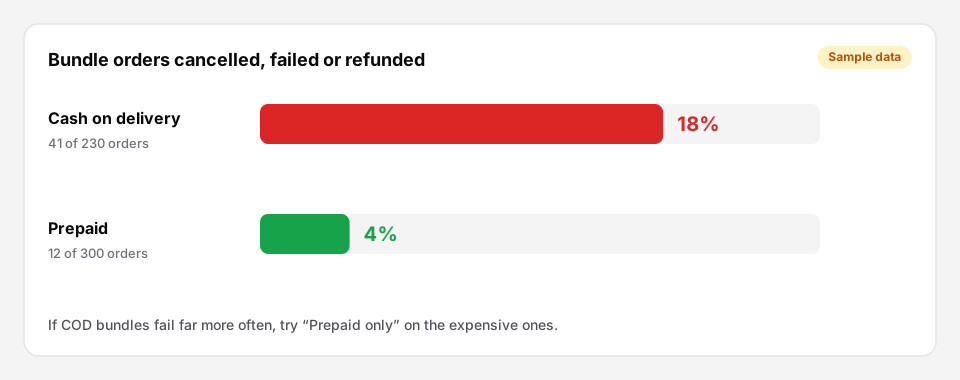 The Pro failure-rate report (sample numbers).
How to use it:
- Leave COD on for a month and look at the failure rates.
- If COD bundles fail far more often than prepaid ones, switch the expensive bundles to prepaid only.
- Compare the next month. If revenue held and failures fell, keep it.
Set COD per bundle
- Free: Nanflows Bundles on WordPress.org has the COD rule on every bundle, and prepaid vs COD orders in its analytics.
- Pro: Nanflows Bundles Pro adds the COD vs prepaid failure rate: how many orders end cancelled, failed or refunded, by payment type. $39 a year for one site, or $149 for up to five, and a first purchase can be refunded within 14 days.
- More on WooCommerce product bundles.
FAQ
Does this work with my COD plugin?
The rules work with WooCommerce’s own payment methods, including WooCommerce’s cash on delivery. The plugin checks a method is switched on before a bundle that needs it goes live.
Is per-bundle COD in the free plugin?
Yes. COD, prepaid only or both, per bundle, is free. The failure-rate report is Pro.
What if a shopper has a normal product and a prepaid-only bundle?
Cash on delivery is hidden for that cart, because the bundle doesn’t allow it.