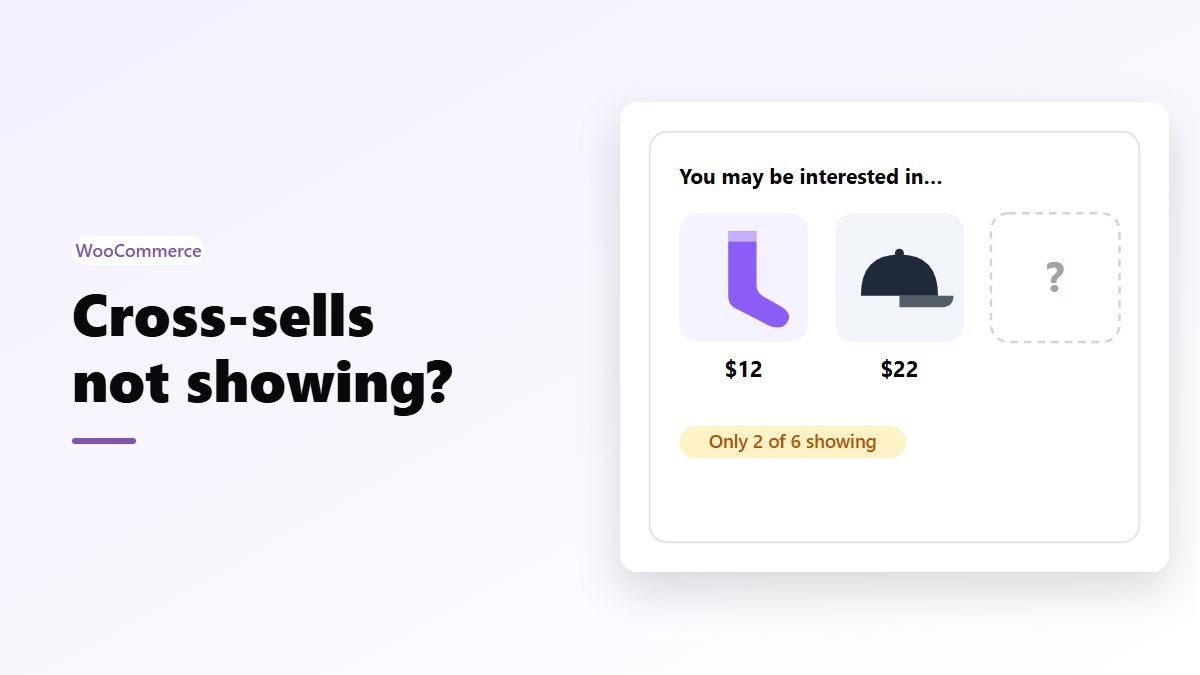
In short: WooCommerce shows cross-sells only on the cart page, and only those set on the products already in the cart. They go missing when they are set on the wrong product, when the Cart block has lost its Cart Cross-Sells block, when the products are hidden, out of stock or already in the cart, or when the theme leaves them out. Even when everything is right, the classic cart page shows just 2. To show them where shoppers look, Nanflows Sliding Cart Pro puts the cross-sells of everything in the cart inside the side cart.
Where WooCommerce shows cross-sells
WooCommerce has two kinds of linked products, set on each product under Product data → Linked Products:
- Upsells show on the product page, under “You may also like…”. They suggest a better version of the product being viewed.
- Cross-sells show on the cart page, under “You may be interested in…”. They suggest products that go with what is in the cart.
That’s all. Cross-sells don’t show on product pages, in the mini cart or at checkout. If you are looking for them anywhere other than the cart page, they are working as designed.
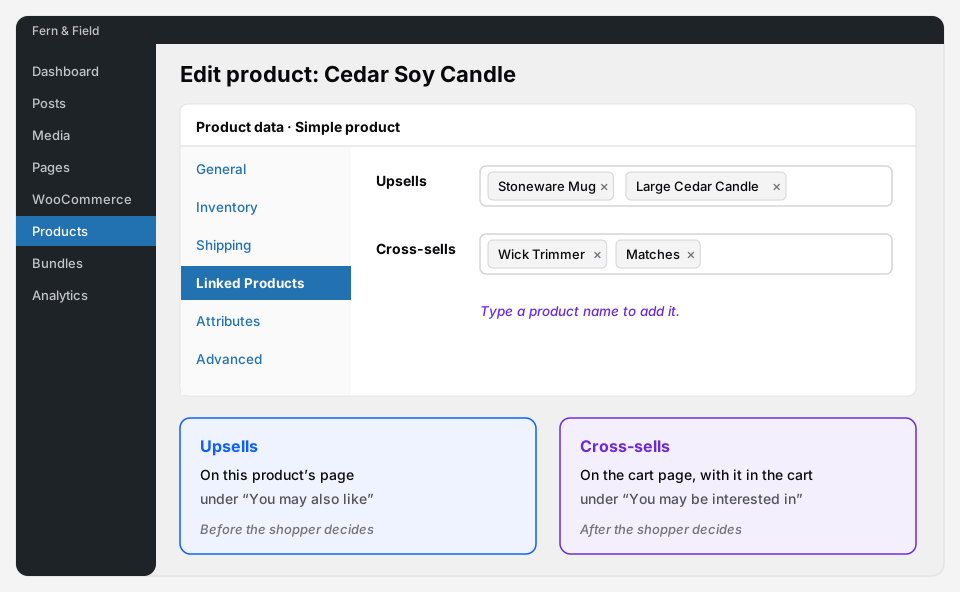 Upsells belong to the product page. Cross-sells belong to the cart.
7 reasons cross-sells are not showing
1. They are set on the wrong product
Cross-sells belong to the product the shopper buys, not to the product you want to suggest. To show wool socks when hiking boots are in the cart, open the boots, go to Linked Products → Cross-sells and add the socks.
For a variable product, set them on the main product. Every variation uses its parent’s cross-sells.
2. You are checking the product page
Cross-sells never show on a product page, whatever the theme. If you want suggestions there, use upsells, or a frequently bought together offer (see the FAQ below).
3. The Cart block lost its Cart Cross-Sells block
Newer stores use the Cart block instead of the old [woocommerce_cart] shortcode. Inside it, cross-sells are their own block, called Cart Cross-Sells. If someone deleted it while editing the cart page, cross-sells disappear without any error.
Open Pages → Cart, select the Cart block, open the List View and look for Cart Cross-Sells under the cart items. If it isn’t there, add it back.
4. The product is already in the cart
WooCommerce leaves out any cross-sell that is already in the cart. If the boots suggest socks and the shopper added socks, there is nothing left to suggest from the boots.
5. The product is hidden or out of stock
Only products a shopper could find in your catalog are shown. A cross-sell is skipped when:
- its Catalog visibility is set to Hidden,
- it is a draft or private, or
- it is out of stock and Hide out of stock items from the catalog is ticked under WooCommerce → Settings → Products → Inventory.
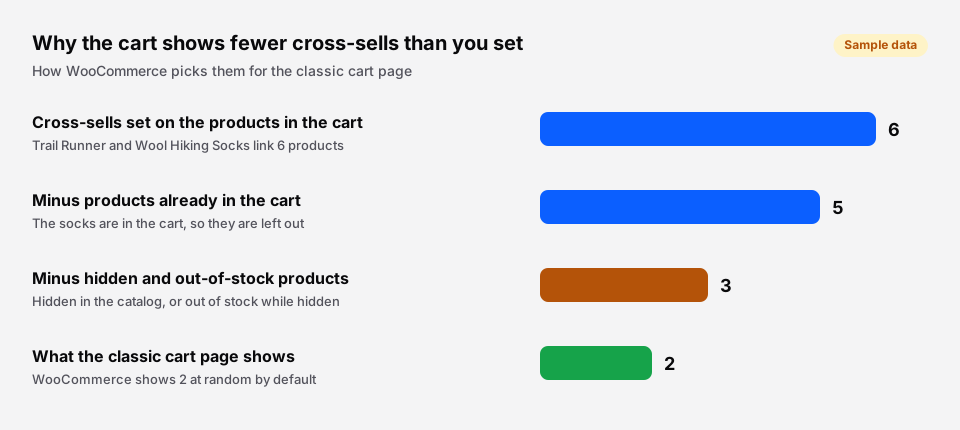 Sample cart. Each rule removes a few, and the cart page shows 2 of what is left.
6. WooCommerce only shows 2
On the classic cart page, WooCommerce picks 2 cross-sells at random from everything that qualifies. If you set five, shoppers see two, and different ones on each visit. To show more, add this to your child theme’s functions.php or a code snippets plugin:
add_filter( 'woocommerce_cross_sells_total', function () {
	return 4;
} );
add_filter( 'woocommerce_cross_sells_columns', function () {
	return 4;
} );
7. Your theme, page builder or cache leaves them out
On the classic cart page, cross-sells are printed by WooCommerce’s woocommerce_cart_collaterals hook. A theme or page builder with its own cart template can drop that hook. To test, switch to a default theme such as Storefront on a staging copy of your site. If cross-sells come back, the theme is the cause.
Check caching too. The cart page should never be served from a page cache, or every shopper sees the cart of whoever loaded it first.
A quick checklist
| Check | Where |
|---|---|
| Cross-sells are on the product in the cart | Product data → Linked Products |
| You are looking at the cart page | Not the product page or mini cart |
| The Cart block has Cart Cross-Sells | Pages → Cart, List View |
| The suggested products are visible and in stock | Catalog visibility, stock, Inventory settings |
| You expect 2 at a time | The woocommerce_cross_sells_total filter |
| The theme prints them | Test with a default theme on staging |
| The cart page isn’t cached | Your caching plugin or host |
Show cross-sells where shoppers actually look
Many shoppers never open the cart page. They add a product, keep browsing, and go straight to checkout. On a store with a side cart, the cart page is barely visited at all.
Nanflows Sliding Cart Pro shows the upsells and cross-sells of everything in the cart inside the side cart, as a carousel or a slider, and adds them with one tap without leaving the page. It uses the same Linked Products you already set, and you can edit every product’s upsells and cross-sells from one screen instead of opening products one by one.
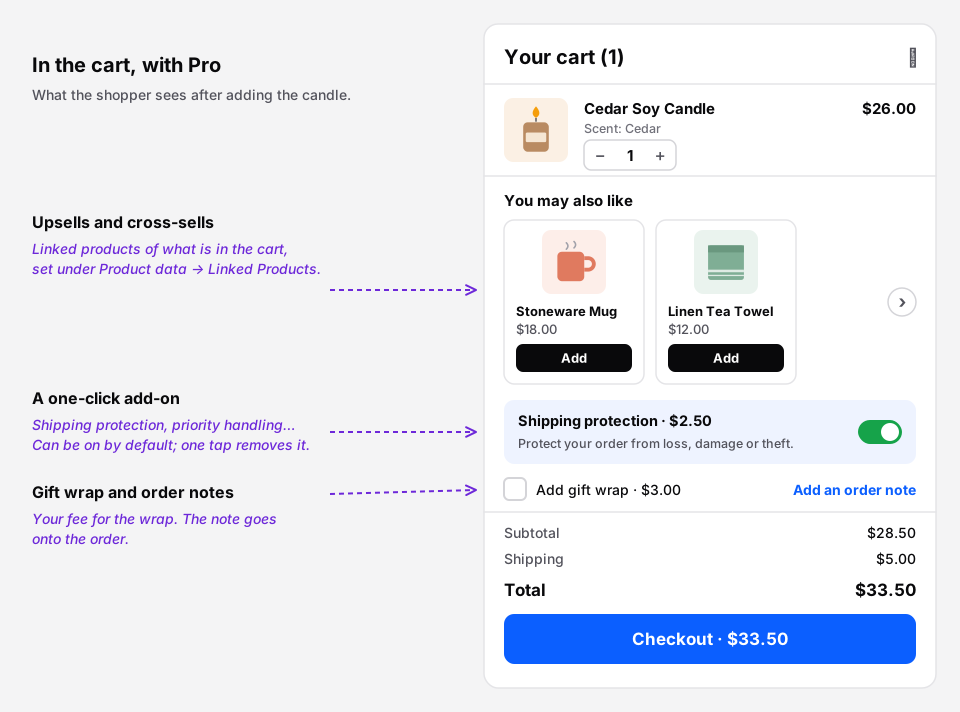 The cart’s suggestions, in the side cart instead of on a page shoppers skip.
More on choosing what to suggest in upsell vs cross-sell and WooCommerce cart upsells.
Get it
- Free: Nanflows Sliding Cart on WordPress.org, the side cart itself, with quantities, coupon, totals and checkout.
- Pro: Nanflows Sliding Cart Pro, $39 a year for one site or $149 for five, with upsells and cross-sells in the cart, rewards and cart analytics, and a 14-day refund.
- More: cart upsells and cross-sells and the WooCommerce side cart.
FAQ
Where do cross-sells show in WooCommerce?
On the cart page only, under “You may be interested in…”. Upsells show on the product page. Neither shows in the mini cart or at checkout by default.
Why are my WooCommerce cross-sells not showing?
Usually because they are set on the wrong product, you are checking the product page, the Cart block is missing its Cart Cross-Sells block, or the products are hidden, out of stock or already in the cart. WooCommerce also shows only 2 at a time on the classic cart page.
How do I show more than 2 cross-sells?
Use the woocommerce_cross_sells_total filter to change how many show, and woocommerce_cross_sells_columns to change the columns. Both apply to the classic cart page.
Can I show cross-sells on the product page?
Not by default. The product page shows upsells and related products. To offer extras on the product page, use a frequently bought together offer: the free Nanflows Bundles plugin adds one, with a discount when the extras are ticked.
Do cross-sells work with the WooCommerce Cart block?
Yes. The Cart block has its own Cart Cross-Sells block inside it. If cross-sells vanished after the cart page was edited, check that block is still there.