In short: pick a WooCommerce bundle plugin by testing how it handles the hard parts, not by counting features. Check that stock comes from the products inside, that orders show the real items, that prices work as a total, a percentage or an amount off, and that it works with your checkout, taxes and coupons. Then check reports and what happens to your bundles if you ever remove it. We make Nanflows Bundles, so we’ve included how it answers each question; judge it by the same list.
Why the choice matters more than it looks
Moving bundles from one plugin to another is slow. Each bundle is rebuilt by hand, and old orders keep the old plugin’s data. So it pays to spend an hour testing two or three plugins on a staging copy of your store before you build the first 40 bundles.
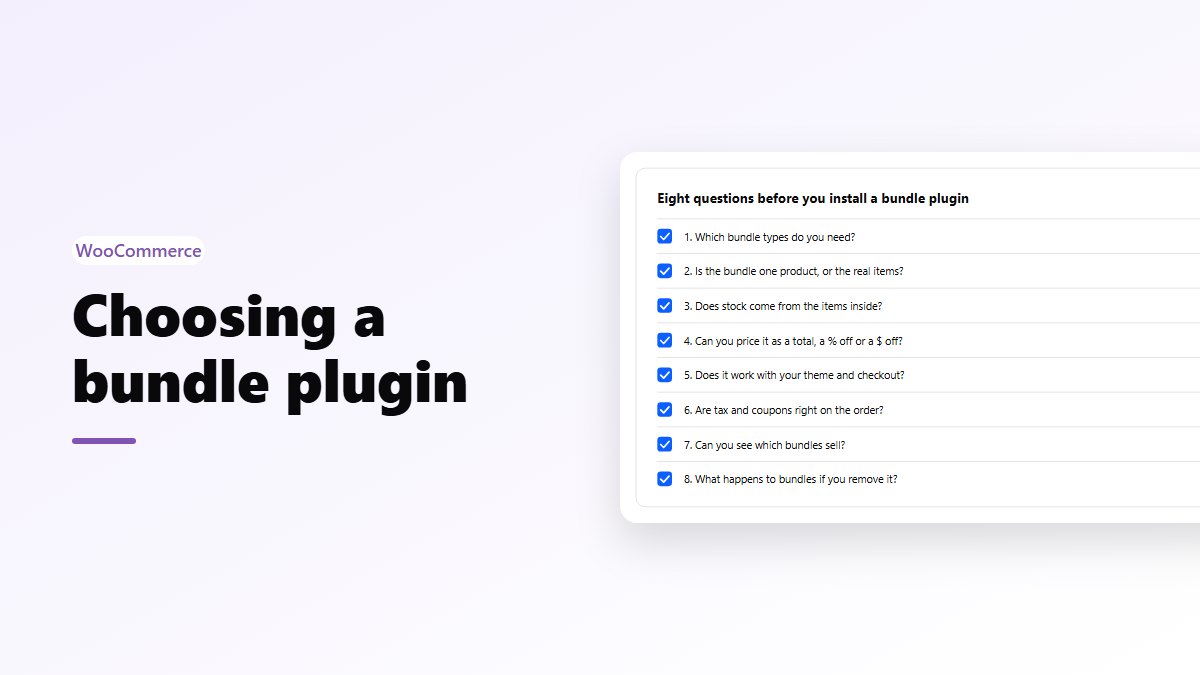
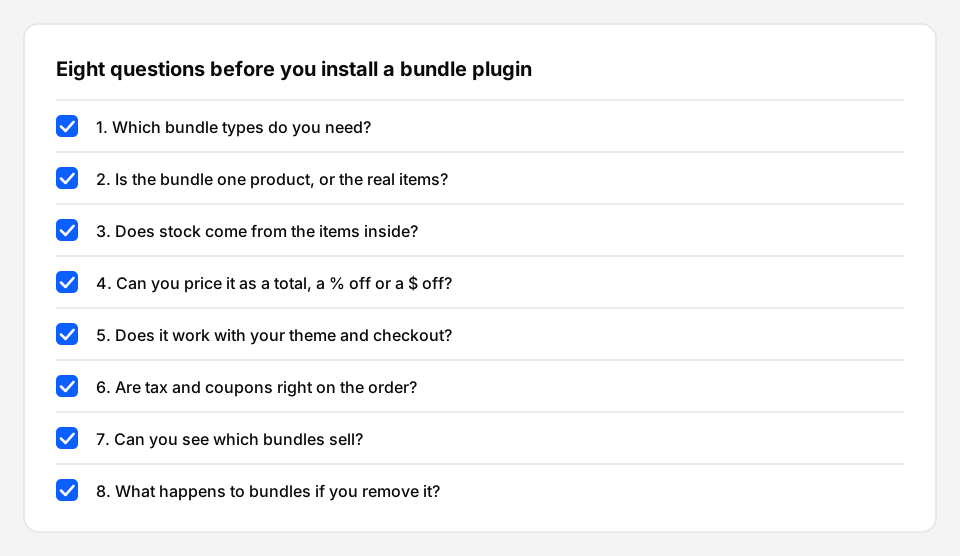 Print it, or keep it open while you test.
1. Which bundle types do you need?
Write down the offers you actually want to run before you look at plugins. Most stores need one or two of these:
| Type | Example | Good for |
|---|---|---|
| Fixed bundle | Shampoo + conditioner for $32 | Kits, routines, gift sets |
| Frequently bought together | Camera + card + bag, untick what you don’t want | Accessories |
| Quantity break | Buy 3, save 10% | Coffee, candles, supplements |
| Mix & match | Any 6 cookies | Food, samples, variety |
| Build your own | Choose 1 top and 1 bottom | Outfits, kits with slots |
| Buy X Get Y | Buy 2, get 1 free | Clearing stock, promotions |
| Gift box | Box of 3 with wrap and a message | Holidays |
If you need only fixed bundles, almost any plugin will do. Mix & match and build your own are where plugins differ most. More on each type in the product bundling guide.
Nanflows Bundles: fixed bundles and frequently bought together are free, with no limit. Pro adds quantity break, volume, mix & match, build your own, Buy X Get Y, fixed + add-ons, gift boxes and variety packs.
2. Is the bundle one product, or the real items?
Look at an order after a test purchase. Can you see which products were in the bundle, with their quantities and variations? Your warehouse picks from that order, and your accounting reads it. A bundle that appears as one line with no contents makes packing slow and returns harder.
Nanflows Bundles: every bundle is a WooCommerce product underneath, which is how it goes into the cart. By default it isn’t listed in the shop, categories, search or sitemap, and its own page sends shoppers to the product page that offers it.
3. Does stock come from the products inside?
This is the most important test. Sell a bundle containing a candle, then check the candle’s stock. It should go down. Then set the candle to 1 in stock and try to buy two bundles. It should refuse. If a bundle has its own separate stock count, you will oversell.
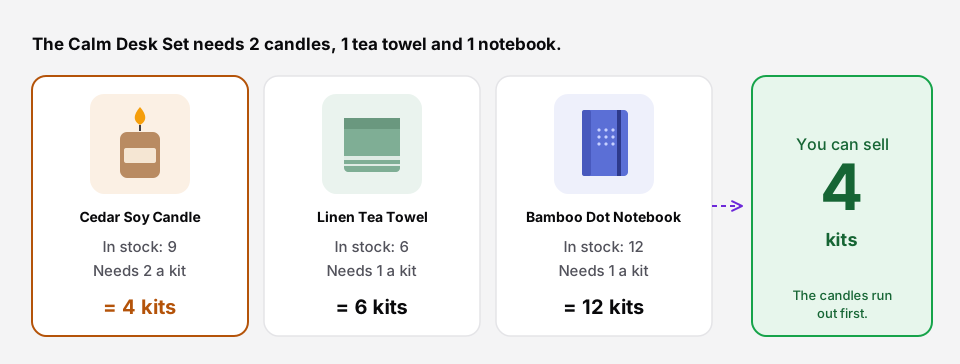 The product with the least stock decides how many bundles can sell.
Nanflows Bundles: a bundle has no stock of its own. The product with the least stock decides how many bundles can be sold, and stock is taken from the products inside when an order is paid and put back on cancellation or a restocking refund, by WooCommerce itself. Overselling is stopped at add to cart, in the cart and at checkout. See bundle stock.
4. Can you price it the way you think?
Three ways of pricing cover almost every offer: a fixed total (“the set for $49”), a percentage off (“save 15%”) and an amount off (“$10 off the set”). Check that the plugin shows the saving clearly, with the full price struck through, and that the price stays right when the shopper picks a pricier variation.
Nanflows Bundles: the free plugin sets one price for a fixed bundle. Pro adds percentage off and amount off.
5. Does it work with your theme and checkout?
Test on your own theme, not the demo site. Then go through checkout with the bundle in the cart:
- Does it work with the Cart and Checkout blocks and with the classic shortcode pages, whichever you use?
- Do your payment gateways, including express buttons like Apple Pay, still appear?
- Does it work with HPOS (high-performance order storage), which new WooCommerce stores use by default?
- Do variable products let the shopper pick a size or color inside the bundle?
Nanflows Bundles: works with the classic cart and checkout and with the blocks, with HPOS, and with variable products, where you fix the variation or let the shopper choose.
6. Are tax and coupons right on the order?
Put a bundle and a normal product in the cart, apply a 10% coupon, and check that the totals, tax and the order in your admin agree. Then refund one item from the bundle. Bundle plugins that rewrite prices in unusual ways tend to fail here, and you find out at tax time.
7. Can you see which bundles sell?
WooCommerce’s own reports show products, not bundles. A plugin should at least tell you bundle orders, revenue and units, so you know which bundles to keep. Better ones show a funnel: how many shoppers saw a bundle, added it, and bought it.
Nanflows Bundles: the free plugin shows bundle orders, revenue, units, average bundle value, and prepaid against cash on delivery, by day. Pro adds a funnel per bundle, the most bundled products, new against returning buyers, placements and CSV exports. See bundle analytics.
8. What happens if you remove it?
Ask this before you install. If you deactivate the plugin, do the bundle products stay visible with wrong prices? Do old orders still show what was in each bundle? Does uninstalling delete your data, or keep it in case you come back? A good plugin answers this in its documentation.
Speed and support
Two more things to check quickly:
- Speed. Open a product page with and without the plugin active, and compare the load in your browser’s developer tools. A bundle plugin should only load its CSS and JavaScript on pages that show a bundle, the cart and checkout.
- Support. Read the plugin’s WordPress.org support forum. Look at how fast questions are answered, not how many there are.
Our honest summary
If you need fixed bundles and “frequently bought together” only, a free plugin is enough, and Nanflows Bundles is a good one to test. If you need mix & match or build your own, test those specific types in two or three plugins on your theme, because that’s where they differ. Compare the options side by side in the best WooCommerce bundle plugins, or head to head: Nanflows vs WooCommerce Product Bundles, vs YITH and vs WPC.
Get it
- Free: Nanflows Bundles on WordPress.org, unlimited fixed bundles and frequently bought together.
- Pro: eight more bundle types, percentage and amount-off pricing, sales rules and reports, $39 a year for one site or $149 for five, on the Nanflows Bundles page.
- Related: free vs Pro and WooCommerce product bundles.
FAQ
What is the best product bundle plugin for WooCommerce?
The one that handles your bundle types on your theme and checkout, with stock taken from the products inside. For fixed bundles and frequently bought together, free plugins such as Nanflows Bundles are enough. For mix & match or build your own, test two or three plugins on a staging copy of your store.
Does WooCommerce have product bundles built in?
No. WooCommerce has grouped products, which list several products on one page so they can be added together, but each sells at its own price, with no saving and no bundle price. Bundles need a plugin.
How should a bundle plugin handle stock?
A bundle should have no stock of its own. It should sell only while every product inside is in stock, and each sale should reduce the stock of those products.
Can I test a bundle plugin without affecting my live store?
Yes. Use a staging copy of your site, which many WordPress hosts create in one click, and place test orders there.
What happens to bundles if I uninstall the plugin?
It depends on the plugin. Check its documentation for what deactivating and uninstalling do to bundle products, prices and old orders before you build many bundles.