In short: a good bundle pricing strategy starts from profit, not from the discount. Add up what the products cost you, then set a bundle price that saves the shopper about 10 to 20% and still earns more per order than the item they came for. A $44 set sold for $38 can earn $23 an order instead of $12. In WooCommerce, the free Nanflows Bundles plugin sets a bundle price or discount, and Pro adds quantity breaks, BOGO and mix and match.
What bundle pricing means
Bundle pricing is selling two or more products together for one price, usually lower than the total of buying each one. It comes in two forms:
- Pure bundling: the products are only sold together. Rare in online stores.
- Mixed bundling: each product has its own price, and the set is cheaper. This is what almost every store does, and what this guide is about.
If you are new to bundles, start with our product bundling guide for the bundle types and which products to put together. This post is about the price.
The bundle pricing formula
Two lines are all you need:
Bundle price = the items’ prices added up − the discount
Bundle profit = bundle price − what the items cost you
Then compare that profit with the order you would get without the bundle. That comparison is the whole test.
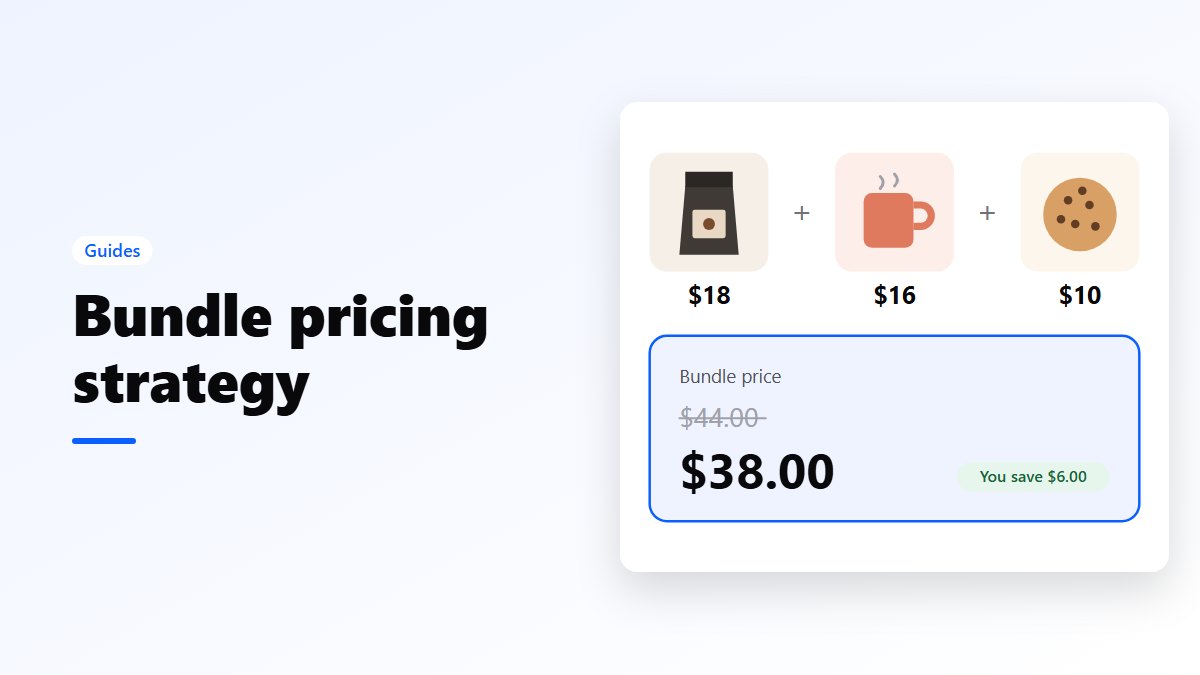
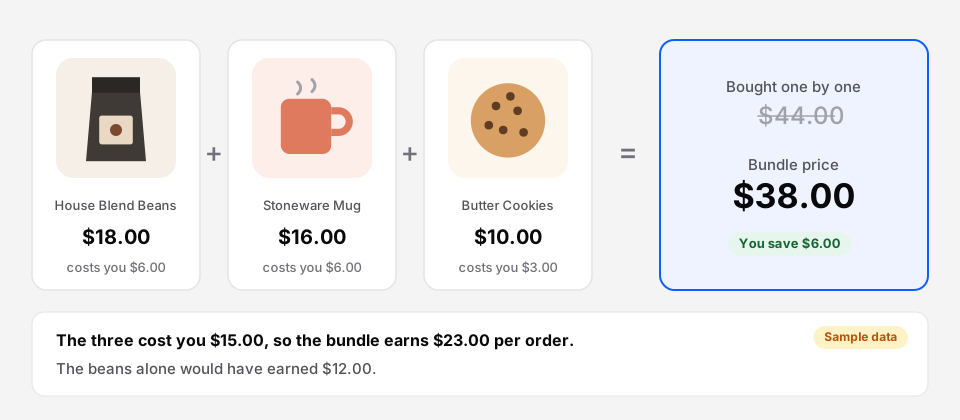 Sample store. The bundle saves the shopper 14% and nearly doubles what the order earns.
Worked through: the beans, mug and cookies sell for $44 one by one and cost you $15. At $38 the bundle earns $23. A shopper who would have bought only the beans earns you $12. So the bundle is worth $11 more per order, even after the discount.
6 bundle pricing strategies, with examples
1. A fixed price for a set
Pick the products and set one price: a starter kit, a skincare routine, a desk set. This is the coffee example above. It works best when the set makes sense as a whole, so shoppers see it as one thing to buy.
Example: a $44 coffee set for $38.
2. A percentage off the set
“Save 15% when you buy these together.” Common for frequently bought together offers on a product page, where shoppers tick the extras they want. A percentage scales with the cart, so it stays fair whatever they pick.
Example: a $60 camera with a $25 bag and an $18 memory card. Bought together at 10% off, $103 becomes $92.70.
3. Quantity breaks
The more of one product they take, the lower the price per item. This suits consumables and anything people buy more than one of: socks, candles, coffee, supplements.
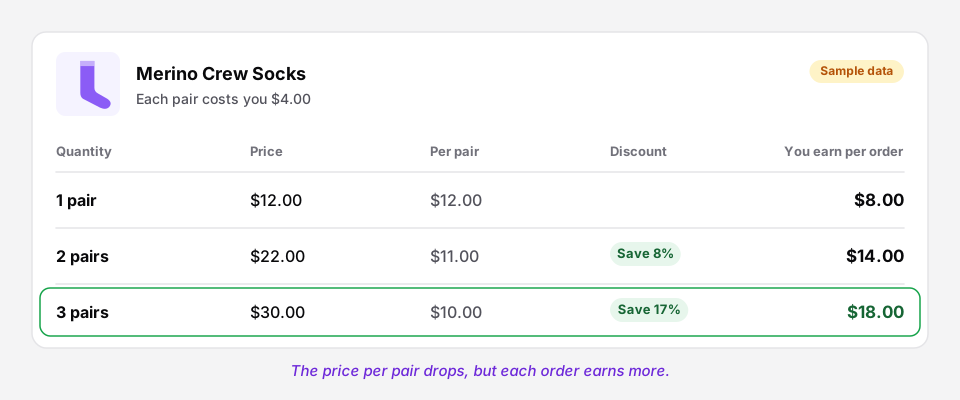 Sample product. The discount grows, but so does the profit on each order.
The price per pair drops from $12 to $10, a 17% saving at three pairs, yet each order earns $18 instead of $8. Quantity breaks work because the extra units cost you far less than they sell for. More in volume discounts vs quantity breaks.
4. BOGO and buy X get Y
“Buy one, get one free” sounds simple, but it is a deep discount. Work out what it really is before you run it:
| Offer | The shopper pays | Real discount |
|---|---|---|
| Buy 1, get 1 free | 1 of 2 items | 50% |
| Buy 2, get 1 free | 2 of 3 items | 33% |
| Buy 1, get 1 at 50% off | 1.5 of 2 items | 25% |
| Buy 3, get 1 free | 3 of 4 items | 25% |
| 10% off when you buy 2 | 1.8 of 2 items | 10% |
On a $20 item that costs you $8, buy 2 get 1 free means $40 for three items that cost $24: $16 of profit, against $12 for one item at full price. It still works, but only just. If your margin is thin, “buy 1, get 1 at 50% off” or a free gift worth less to you than to the shopper is safer. See BOGO and buy X get Y in WooCommerce.
5. Mix and match at one price
“Any 3 for $45.” Shoppers pick from a group of products, and every combination costs the same. The trap is that they will often pick the most expensive items.
So price it from the combination that earns you the least. If the group has items between $15 and $19, a $45 price for three is a 21% discount on the dearest three ($57) but nothing at all on the cheapest three. Check the profit on the expensive mix first. More in mix and match products in WooCommerce.
6. Gift boxes and build your own
The shopper fills a box step by step, and the box often adds a fee for wrapping or a message. Here the value is the convenience and the presentation, so a small discount, or none, is fine. Gift buyers care more about getting it right than about saving a few dollars. See the gift box builder.
How much to discount a bundle
There is no single right number, but these rules hold up:
- Start around 10 to 15%. It is enough to notice and leaves room to go higher if the bundle doesn’t move.
- Go deeper on slow stock. A bundle that pairs a best seller with a product that isn’t selling can afford 20% or more, because you would otherwise discount the slow product on its own.
- Show the saving in the format that looks bigger. Under $100, a percentage usually looks larger (“save 15%”). Above $100, a dollar amount does (“save $25”). Jonah Berger calls this the Rule of 100 in his book Contagious.
- Always show the separate price crossed out. The saving is only real to the shopper if they can see what the items cost one by one.
Bundle pricing mistakes to avoid
- Discounting from the price instead of the margin. 20% off sounds the same on every product, but on a low-margin item it can wipe out the profit.
- Bundling two best sellers. They sell anyway. You give away margin on orders you would have had. Pair a best seller with a product that needs help.
- Forgetting shipping. A heavy bundle can cost more to ship than you saved on the discount. Check it against your shipping rates.
- Too many options. Three bundles on a page get compared. Ten get ignored.
- Judging by bundles sold. Measure revenue and profit per order, and your average order value, before and after. A bundle that sells a lot but lowers profit per order is a discount, not a win.
How to set bundle prices in WooCommerce
With Nanflows Bundles, each bundle gets its pricing in the bundle editor. You choose one of four:
- A fixed bundle price, such as $38.
- A percentage off the items.
- An amount off, such as $6.
- The items’ own total, with no discount, for kits sold for convenience.
The product page shows the separate prices crossed out with the saving, stock comes from the products inside, and checkout, taxes and coupons work as usual. Quantity breaks, BOGO, buy X get Y, mix and match, volume discounts and gift boxes are in Bundles Pro.
Get Nanflows Bundles
- Free: Nanflows Bundles on WordPress.org, with fixed bundles and frequently bought together.
- Pro: Nanflows Bundles Pro, $39 a year for one site or $149 for five, with every bundle type above and a 14-day refund.
- See each type: WooCommerce product bundles, volume discounts and tiered pricing, BOGO and mix and match.
FAQ
How do you calculate bundle pricing?
Add up the prices of the products, take off the discount, and you have the bundle price. Then subtract what the products cost you to get the bundle’s profit, and check it is higher than the profit of the order you would get without the bundle.
What is a good discount for a bundle?
Around 10 to 15% for most stores, and up to 20% or more when the bundle helps sell slow stock. Work from your margin, not from a fixed percentage.
What is an example of bundle pricing?
A coffee shop sells beans for $18, a mug for $16 and cookies for $10. Together they would be $44, so it sells the three as a gift set for $38. The shopper saves $6, and the order earns more than the beans alone would.
Is bundle pricing profitable?
It is when the bundle earns more per order than the shopper would have spent without it. Extra items usually cost you far less than their price, so a modest discount on three items can earn more than one item at full price.
What is the difference between pure and mixed bundling?
With pure bundling, the products are only sold as a set. With mixed bundling, each product is also sold alone, and the set is cheaper. Most online stores use mixed bundling.
Should I show the discount as a percentage or in dollars?
Use whichever number looks bigger: a percentage for bundles under $100, and a dollar amount above $100.