Help center › Manage and grow
Suggestions from your orders Pro
Pro looks at your paid orders and finds products your customers often buy together. Turn any of them into a “frequently bought together” offer in one click.
-
Find the suggestions
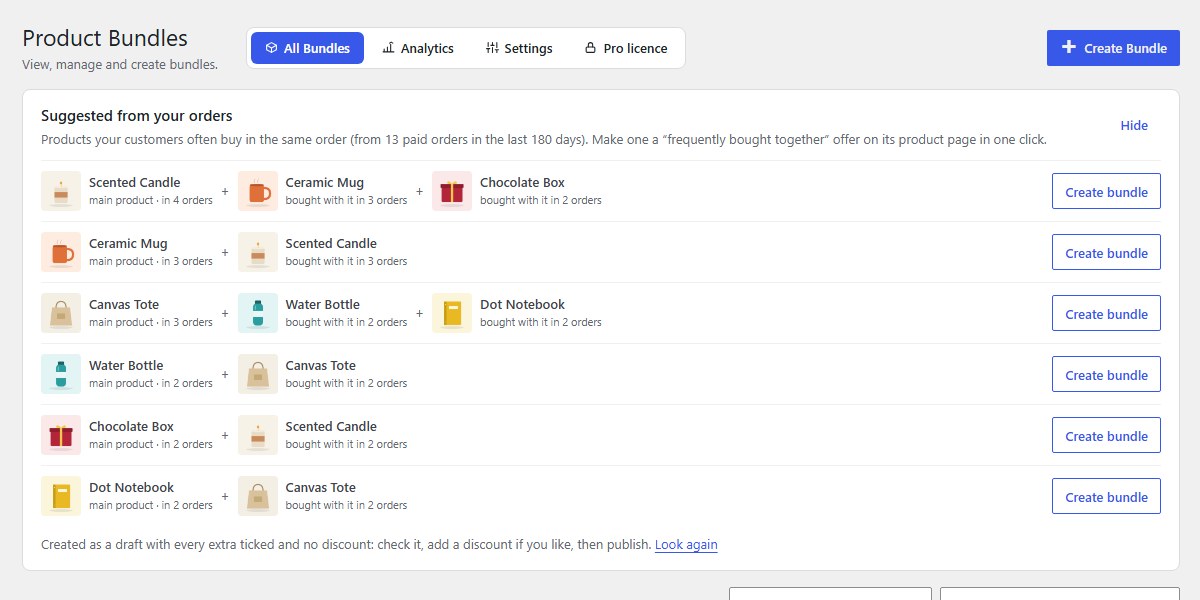
Open Bundles. Suggested from your orders sits above the list: products bought in the same order, from your paid orders of the last 180 days. Each row shows the main product, the products bought with it, and in how many orders.
-
Click Create bundle
The suggestion becomes a “frequently bought together” bundle on the main product’s page, saved as a draft with every extra ticked and no discount.
-
Check it and publish
Open the draft, add a discount if you like (see Frequently bought together), then click Publish bundle.
-
Hide or refresh
Hide folds the panel away; Look again checks your newest orders.
Nanflows Bundles · Need help? support@nanflows.com